


Quick Answer: 3-on-a-page checks are business check stock where three individual checks print per full-size sheet with no attached stubs. Payment records stay in your accounting software instead of on physical paper. This format is called Standard in QuickBooks. It is most efficient for high-volume accounts payable runs. It is not the right format for payroll in states requiring physical pay stubs. Always confirm the format setting in your software before ordering.
What Are 3-on-a-Page Checks
3-on-a-page checks are business check stock that prints three individual checks on a single 8.5 by 11 inch sheet of paper. Each check sits one above the other, occupying approximately 3.5 inches of the page. The checks are separated by perforations that allow clean tear-out. There are no attached stubs.
The name comes directly from the physical layout: three checks, one page. In QuickBooks, this format is called Standard in the Check Style selector. In other accounting platforms it may be called Standard, 3-per-page, or simply listed by the check dimensions.
3-on-a-page checks are the second most popular business check format after voucher (check-on-top). They are used primarily for accounts payable runs where digital software records replace physical paper stubs, and for any business that prioritizes paper efficiency and per-check cost over physical stub documentation.
How 3-on-a-Page Checks Work
The workflow is the same as any computer check format. Your accounting software handles the data. The check stock handles the physical security layer.
What the Check Stock Does
The check stock arrives pre-printed with your business name, bank name, routing number, account number, and starting check number. The MICR line at the bottom of each check is pre-printed in certified magnetic toner. Security features are embedded in the paper ; chemically sensitive coating, void pantograph, microprinting, UV fluorescent fibers, heat-sensitive ink, and genuine watermark. None of this is printed at run time. It ships on the stock before it reaches you.
What Your Accounting Software Does
When you run a check print job in QuickBooks or another compatible platform, the software sends a print command for each payment. The print command positions the variable data fields for all three checks on the sheet: payee name, dollar amount in numerals, dollar amount in words, date, and check number. Your laser or inkjet printer outputs these fields onto the pre-printed stock in one pass per sheet, producing three completed checks ready to sign and mail.
Where the Payment Records Go
With voucher checks, one physical stub per check stays with you as a paper accounts payable log. With 3-on-a-page checks, no physical record attaches to each payment. The payment record lives entirely inside your accounting software. Every check QuickBooks or your platform prints is automatically recorded in the check register, accounts payable ledger, and vendor history in the software. The digital record replaces the physical stub.
3-on-a-Page Checks vs Voucher Checks: Full Comparison
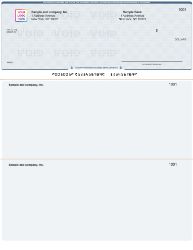
Voucher (check-on-top) format ; one check per page with two detachable stubs. Compare with 3-on-a-page above.
| Factor | 3-on-a-Page (Standard) | Voucher (Check-on-Top) |
|---|---|---|
| Checks per sheet | 3 per 8.5 by 11 inch sheet | 1 per 8.5 by 11 inch sheet |
| Attached stubs | None | Two perforated stubs per check |
| Payment records | Digital only ; in accounting software | Physical stub plus digital in software |
| Per-check paper use | One-third of a sheet per check | One full sheet per check |
| QuickBooks setting | Standard | Voucher |
| Best for | High-volume AP; digital-first operations | Payroll; AP requiring remittance stubs |
| Payroll use | Not recommended in most states | Standard choice for payroll |
| Paper efficiency | 3x more efficient than voucher | One sheet per payment |
For a deeper comparison of when to use voucher format vs other check formats for different business situations, see voucher checks vs wallet checks: when to use each.
Who Should Use 3-on-a-Page Checks
High-Volume Accounts Payable Operations
If your business cuts 50 or more vendor checks per week, 3-on-a-page format delivers a meaningful efficiency advantage. Each print job runs three payments per sheet rather than one, cutting your paper use by two-thirds for the same number of payments. Over a month of regular AP runs, the paper savings are measurable. Over a year, they are significant at higher volumes.
Businesses That Track Everything Digitally
If your business runs QuickBooks, Sage, Xero, MYOB, or any other accounting platform and relies entirely on software records for accounts payable documentation, 3-on-a-page checks are the right fit. The digital records in your accounting software serve the same function as a physical stub. You get searchable, permanent payment history without the physical paper overhead of a stub per check.
Non-Profits, Schools, and Foundations
Organizations that process regular vendor payments, grant disbursements, and operational expenses but do not run employee payroll through check printing benefit from the paper and cost efficiency of 3-on-a-page format. Grant management software and accounting platforms used by non-profits typically support this format.
Small Businesses With Consistent Vendor Rosters
A small business with 10 to 20 regular vendors paid monthly by check gets the same per-check cost efficiency without needing the stub record that a larger AP operation might want. When vendor relationships are consistent and payment details are simple, digital records in the accounting platform are sufficient documentation.
Property Management Companies
Property managers cutting maintenance vendor checks, utility payments, and owner distributions typically process high volumes across multiple accounts. 3-on-a-page format reduces paper overhead for these runs while software records maintain the payment audit trail by property and vendor.
Who Should NOT Use 3-on-a-Page Checks
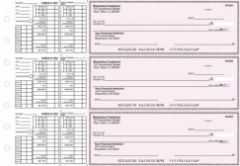
Payroll business checks from Checkomatic ; voucher format with stubs for employee pay documentation.
Businesses Running Payroll in Stub-Required States
This is the most important restriction on 3-on-a-page checks. Many US states require employers to provide employees with an itemized wage statement at every pay period showing gross earnings, tax withholdings, deductions, and net pay. A 3-on-a-page check has no stub. An employee who receives a stub-free check receives only the check amount ; no wage detail. If your state requires physical pay stubs at each pay period, using 3-on-a-page format for payroll puts you out of compliance unless you print and distribute separate pay stubs alongside every check.
For payroll, use voucher format. One check per page with two detachable stubs provides the physical wage documentation employees need and satisfies state itemized wage statement requirements at the point of payment. For the complete guide to payroll check formats, see business checks for payroll: the complete employer guide.
Businesses Whose Vendors Require Remittance Stubs
Some vendors, particularly large suppliers with high-volume AP processing departments, require a remittance advice document to match your payment to their open invoices. A voucher check stub serves this function at no extra step ; the stub tells the vendor exactly which invoices your check covers. A 3-on-a-page check provides no such document. If you pay vendors who require remittance advice, either use voucher format or print separate remittance documents and mail them with each 3-on-a-page check.
Businesses Without Reliable Accounting Software
3-on-a-page checks work only when a software system maintains the digital payment records that the missing physical stubs would otherwise provide. If your business does not use accounting software consistently, or if the software records are poorly maintained, 3-on-a-page format leaves you without a reliable payment audit trail. In that situation, voucher format provides a physical backup record per payment that exists independently of any software system.
Which Accounting Software Supports 3-on-a-Page Checks
Most major accounting platforms with check printing functionality support 3-on-a-page format. The format you order must match your software's configured print layout.
QuickBooks Desktop and Online
QuickBooks calls this Standard format. It is available across all QuickBooks Desktop editions (Pro, Premier, Enterprise) and all QuickBooks Online subscription tiers. In QuickBooks Desktop, select Standard in File, Printer Setup, Check Style. In QuickBooks Online, select Standard in the gear icon, Print Checks setup. The 3-on-a-page stock must be in your printer when you select Standard. For the complete QuickBooks Desktop print setup walkthrough, see how to print checks from QuickBooks Desktop in 2026. For QuickBooks Online, see how to set up check printing in QuickBooks Online: step by step.
Sage 50, Xero, and MYOB
Sage 50, Xero, and MYOB all support 3-on-a-page check printing through their check printing modules. The format name and the path to select it vary by platform. Confirm the format selection in your specific software's check printing settings before ordering. Checkomatic's 3-on-a-page check stock is compatible with all three platforms and carries the same MICR pre-printing that clears at any US bank.
Quicken
Quicken supports check printing and includes a 3-per-page option in addition to voucher and wallet formats. Personal and home business Quicken users who print checks for regular vendor or contractor payments find the 3-on-a-page format particularly practical at lower volumes.
Other Platforms
Any accounting platform that includes check printing functionality and a format selector that lists 3-per-page, Standard, or a similar label supports this check stock format. If your platform is not listed, contact Checkomatic before ordering. Custom formatting is available for non-standard software configurations. For all compatible platforms and format guidance, see QuickBooks-compatible checks: voucher, wallet, and 3-on-a-page explained.
Cost Savings: 3-on-a-Page vs Voucher Format
The per-check cost difference between 3-on-a-page and voucher format comes directly from paper use. Three checks on one sheet means one-third of the paper per check compared to voucher format.
How the Savings Work at Scale
Consider a business that cuts 100 vendor checks per month. With voucher format, that is 100 sheets of check stock per month, or 1,200 sheets per year. With 3-on-a-page format, the same 100 checks use approximately 34 sheets per month, or 400 sheets per year. The per-sheet price of both formats is similar. The reduction in sheets needed is where the savings come from.
For businesses with lower check volumes ; under 20 checks per month ; the cost difference between formats is small enough that the stub versus no-stub decision matters more than the cost calculation. For businesses printing 100 or more checks per month, the cost and paper difference is meaningful.
When Cost Is Not the Right Deciding Factor
If your payroll requires stubs or your vendors require remittance documentation, no cost advantage justifies choosing 3-on-a-page. The stub provides compliance and documentation value that costs more to replicate separately than the savings on paper. Use the right format for your workflow, then benefit from cost efficiency where it applies.
How to Confirm Your Format Before Ordering
The single most important step before ordering any check stock is confirming your software's format setting. A format mismatch between your check stock and your software setting wastes the entire order.
QuickBooks Desktop
- Open QuickBooks Desktop.
- Go to File, then Printer Setup.
- In the Form Name dropdown, select Check or Paycheck.
- Look at the Check Style field. If it shows Standard, order 3-on-a-page stock. If it shows Voucher, order voucher stock.
QuickBooks Online
- Click the gear icon in the upper right corner.
- Under Tools, select Print Checks.
- The check style selector shows your current setting. Standard means 3-on-a-page.
Other Software
Open the check printing or payment settings in your platform. Look for a format selector, check style field, or print template option. The preview shown in that setting tells you exactly which format to order. If the preview shows three checks on one page with no stubs, order 3-on-a-page stock.
For all 3-on-a-page formats in QuickBooks-compatible and general computer check versions, browse QuickBooks checks 3 on a page and computer checks 3 on page at Checkomatic.
Common 3-on-a-Page Check Ordering Mistakes
Mistake 1: Ordering 3-on-a-Page When the Software Is Set to Voucher
This is the most common and most costly mistake. If QuickBooks is set to Voucher and you load 3-on-a-page stock, the check layout prints in the wrong third of the sheet. The payee line, amount, and date all land in positions designed for a full-page voucher layout. Every check in the batch is unusable. Always check the software setting first. Always.
Mistake 2: Using 3-on-a-Page for Payroll Without Checking State Requirements
Switching payroll to 3-on-a-page format to reduce costs and then discovering mid-year that your state requires physical pay stubs is an avoidable compliance problem. Check your state's wage statement law before making the switch. If stubs are required, stay with voucher format for payroll. See business checks for payroll: the complete employer guide for payroll check format guidance.
Mistake 3: Not Running a Paper Alignment Test First
Even with the correct format selected, individual printer models can introduce minor scaling differences. Print the test page in QuickBooks printer settings on plain paper, hold it against your actual check stock, and confirm field alignment before running a full batch. Five minutes of testing prevents wasting an entire batch of check stock.
Mistake 4: Assuming 3-on-a-Page Works for All Vendors
Before switching from voucher to 3-on-a-page for accounts payable, confirm that your key vendors do not require a physical remittance stub with payment. Most vendors do not require it, but large suppliers with structured AP processing departments sometimes do. A quick check with your five largest vendors before switching format takes ten minutes and prevents payment processing problems.
Mistake 5: Ordering Without Checking Starting Check Number
If you are switching from voucher to 3-on-a-page stock for the first time, the new stock must continue your existing check number sequence. Do not restart at 1001 unless you are opening a new bank account. Your accounting software and your bank both track check numbers, and gaps or restarts in the sequence create reconciliation confusion. Note your last used check number from your current supply and set the starting number on your 3-on-a-page order to continue from there.
What Customers Say About Checkomatic
All reviews below are published on checkomatic.com and reproduced verbatim. Source: checkomatic.com/quickbooks-starter-pack-product, 4.5 stars from 166 verified reviews.
"Been with them for 15 years. Always reliable, always good quality, good service. What more can you ask for?"
ATV Inc. | ★★★★★ 5/5 | April 5, 2024 | Source: checkomatic.com/quickbooks-starter-pack-product
"First time ordering and I am super impressed with the quality of the checks. No issues with delivery. I will be ordering again!"
TClinton | ★★★★★ 5/5 | April 9, 2025 | Source: checkomatic.com/quickbooks-starter-pack-product
"We use CheckoMatic for all of our check needs! They have great prices and we receive our products in a timely manner!"
CG's Tax Service | ★★★★★ 5/5 | September 18, 2024 | Source: checkomatic.com/quickbooks-starter-pack-product
"I got 500 checks for less than half of what the bank wanted for 200!"
VVA Voucher Checks (Vietnam Veterans of America) | ★★★★★ 5/5 | July 6, 2024 | Source: checkomatic.com/quickbooks-starter-pack-product
"ASJ Wilson Construction has been a client of checkomatic for some years now and they've never disappointed this company. Thank you checkomatic for all that you do."
ASJ Wilson Construction | ★★★★★ 5/5 | June 6, 2024 | Source: checkomatic.com/quickbooks-starter-pack-product
"Affordable and efficient. My go-to business check printer."
Doe | ★★★★★ 5/5 | January 24, 2025 | Source: checkomatic.com/quickbooks-starter-pack-product
Why Choose Checkomatic for 3-on-a-Page Business Checks
Pre-Formatted for QuickBooks Standard Template
Checkomatic's 3-on-a-page check stock is sized and positioned to match QuickBooks Standard print template alignment for all current QuickBooks Desktop and Online versions. The alignment adjustment most users need is minimal. Check stock not pre-calibrated to your software's template may require significant alignment adjustments and multiple test runs.
MICR Line Pre-Printed on Every Sheet
The MICR line at the bottom of each check is pre-printed in certified magnetic toner before the stock ships and verified against the Federal Reserve E-Payments Routing Directory. Your laser or inkjet printer handles only the variable fields QuickBooks generates. No MICR toner required from your printer.
Six Security Features at Base Price
Chemically sensitive paper, microprinting, void pantograph, UV fluorescent fibers, heat-sensitive ink, and genuine watermark ; all standard on every 3-on-a-page order regardless of quantity. No security upgrade fee. The same fraud prevention built into Checkomatic's voucher format ships on every 3-on-a-page order at no additional cost.
All Computer Check Formats Available
If you determine that 3-on-a-page is not the right fit for your workflow after reading this guide, every other format is available at the same facility. Voucher (check-on-top), check-in-middle, check-on-bottom, and 3-on-a-page formats all manufactured in Monroe, NY. Browse all formats at computer checks for business.
Order Directly for QuickBooks or General Computer Check Use
For QuickBooks-specific 3-on-a-page stock verified compatible with all QB versions, see QuickBooks checks 3 on a page. For general-purpose 3-on-a-page computer checks compatible with Sage, Xero, MYOB, Quicken, and other platforms, see computer checks 3 on page.





