


What Does "Business Check Printing Cost" Actually Mean?
The phrase covers two completely different questions depending on who is asking.
The first question is what it costs to order pre-printed checks from a manufacturer, bank, or direct supplier. That question is answered in full at how much do business checks cost.
The second question is what goes into setting up and running in-house check printing, using blank check stock, MICR printing equipment, and check printing software. That is what this article covers.
These are fundamentally different decisions with different cost structures, different ongoing responsibilities, and different trade-offs. Understanding both sides of the comparison is what allows a business to make the right choice for its specific situation.
Is In-House Business Check Printing Legal?
Yes. There are no federal laws in the United States prohibiting a business from printing its own checks. In-house check printing is a standard practice across accounting firms, mid-size businesses, and organizations running high-volume AP or payroll operations.
The requirement is not about whether you print, but about whether the printed check meets Federal Reserve and ABA processing standards. The MICR line at the bottom of every check must meet ANSI X9.27 specifications for signal strength, font, and positioning. A check that fails those standards will fail automated bank processing and generate a technical return, regardless of whether everything else on the check is correct.
What Equipment Does In-House Business Check Printing Require?
Bank-compliant check printing requires four components. Each carries its own requirements and compatibility considerations. A gap in any one of them produces checks that banks cannot process reliably.
What Is MICR and Why Does It Matter for Business Check Printing?
MICR stands for magnetic ink character recognition. The MICR line at the bottom of every business check contains the ABA routing number, bank account number, and check number, printed in the MICR E-13B font using certified magnetic ink. When a check enters the banking system, automated readers detect the magnetic signal to capture those numbers without human involvement. This is how the US banking system processes billions of checks with near-zero manual handling.
ANSI X9.27 defines the minimum magnetic signal strength, font dimensions, and positioning requirements every check must meet for bank processing. Non-compliant checks generate technical returns regardless of whether the check amount, signature, and payee are correct.
Can I Use a Regular Laser Printer for Business Check Printing?
A standard office laser printer can print all the visible parts of a business check. It cannot reliably print the MICR line. Standard toner contains no magnetic material, so the printed routing and account numbers produce no magnetic signal for bank readers to detect.
To print a MICR-compliant check, you need either a dedicated MICR laser printer (hardware specifically tuned and certified for MICR toner output) or a compatible standard laser printer that accepts MICR toner cartridges. Not all laser printers accept MICR toner. Many dedicated MICR printers include a toner detection feature that prevents installation of a non-MICR cartridge, eliminating the accidental standard-toner print risk. Always verify printer-toner compatibility before purchasing any equipment.
What Are the MICR Printer Requirements for In-House Check Printing?
When evaluating MICR printers for in-house business check printing, the key factors to assess are:
- MICR certification: The printer must be certified or confirmed compatible with ANSI X9.27-compliant MICR toner. This is the baseline requirement for producing bank-processable checks.
- Monthly duty cycle: Every printer is rated for a maximum number of pages per month. Exceeding that rating increases maintenance frequency and accelerates drum wear, which can degrade MICR signal quality over time.
- Locking tray availability: Many businesses store blank check stock in the printer tray. A locking paper tray controls unauthorized access to the stock between print runs.
- Toner compatibility: MICR toner is model-specific. The printer must accept certified OEM MICR toner from a compliant supplier. Using non-certified or substitute toner risks MICR signal failure.
- Speed and capacity: For payroll runs or AP batches, print speed and sheet capacity determine how long a print job takes. Slow throughput on large check volumes creates operational bottlenecks.
Hardware is a one-time setup investment, but its ongoing operational impact on MICR compliance, maintenance overhead, and printing reliability makes the initial selection decision consequential for years.
Is MICR Toner Required to Print Business Checks?
Yes, without exception. MICR toner is the ongoing supply requirement that makes in-house check printing different from standard document printing. It costs more than standard laser toner for the same printer model because it contains iron oxide particles that produce the magnetic signal bank readers require.
What Happens If the Wrong Toner Is Used?
Using standard toner to print the MICR line produces a check that looks visually identical to a correctly printed check but generates no magnetic signal. When that check reaches the bank's automated reader, the MICR line is unreadable and the check is returned as a technical return. The issuing business receives a return notification, incurs a bank return fee per item, and must reprint and reissue the check. The vendor or payee relationship is also disrupted.
Dedicated MICR printers with toner detection features prevent this scenario by refusing to print if a non-MICR cartridge is installed. On printers without this feature, the responsibility falls on the person loading toner to verify the cartridge type before every replacement.
How Many Checks Does One MICR Toner Cartridge Print?
This depends on which check format you print. A check-on-top format prints one check per 8.5 x 11 sheet. A 3-on-a-page format prints three checks per sheet. A cartridge rated at a given page yield produces that many checks on check-on-top stock or approximately three times as many checks on 3-on-a-page stock.
This means format selection has a significant effect on how far a toner cartridge goes. Businesses that print large volumes of AP or payroll checks on 3-on-a-page format get substantially more checks per cartridge than businesses printing check-on-top. Toner yield ratings are also based on standard 5% page coverage assumptions. MICR check printing may differ from that baseline. Always verify actual yield for your specific printer, format, and usage pattern with your toner supplier.
What Happens If MICR Toner Signal Degrades?
MICR toner quality can degrade as a cartridge ages, as drum wear accumulates, or when storage conditions affect the cartridge. A degraded MICR signal produces checks that look visually correct but fail magnetic verification at the bank. The result is technical returns: unprocessable checks returned through the banking system.
Periodic MICR signal verification using a MICR reader gauge is the standard control for this risk in high-volume check printing environments. Building verification into the AP or payroll workflow adds a step but prevents the larger disruption of returned checks and damaged vendor relationships.
What Are the Blank Check Stock Requirements for In-House Printing?
Blank check stock is pre-formatted security paper. It carries the check layout, perforations, and a security background but contains no pre-printed banking information. Your check printing software fills in the routing number, account number, and all check details at print time using MICR toner.
What Security Features Should Blank Check Stock Have?
The security level of blank check stock directly affects the fraud protection of every check you print. Basic blank stock without security features leaves printed checks vulnerable to check washing, counterfeiting, and alteration. CPSA-certified blank check stock includes security features such as chemical-reactive paper, void pantograph, microprinting, and watermark that protect the check through its full lifecycle from printing to bank processing.
Higher-security blank stock provides stronger protection but comes with a higher per-sheet investment. For businesses weighing blank stock options, see blank checks and check stock paper for format and security specifications. For a deeper look at check security risks, see check fraud prevention and check washing guide.
Does Blank Check Stock Reduce Stolen Check Fraud Risk?
Yes, in one specific direction. A stolen sheet of blank check stock is not immediately useful to someone attempting check fraud. Without MICR printing infrastructure, the routing number and account number cannot be added to the paper in a bank-processable form. Pre-printed check stock already carries that information, making it potentially more immediately usable if stolen.
The offset is that blank stock held on-site requires locked, access-controlled storage to prevent misuse by anyone who does have access to the printing setup. Internal controls over blank stock storage and access are a required part of any in-house printing security program.
Does Blank Stock Work for Multi-Account Businesses?
Yes, and this is one of the genuine operational advantages of blank check stock. A business with multiple bank accounts, multiple entities, or multiple client accounts can use a single blank stock inventory across all of them. The check printing software prints the correct routing and account number at print time for whichever account the payment is drawn on. With pre-printed checks, each account requires a separate stock order, which adds inventory management and reorder overhead.
For available blank stock formats compatible with QuickBooks, Quicken, Sage, and other accounting software, see blank checks.
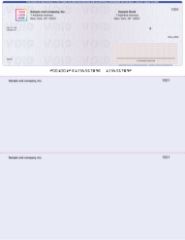
Check-on-top blank stock: compatible with QuickBooks and most accounting software check printing modules. Available from Checkomatic at blank checks.
What Software Is Needed to Print Business Checks In-House?
Check printing software generates the complete check layout including the MICR E-13B font at the correct position for the routing and account numbers. Without software that outputs ANSI X9.27-compliant MICR positioning, even a correctly configured printer and toner cannot produce a bank-processable check.
What Check Printing Software Options Are Available?
- QuickBooks Desktop or QuickBooks Online: Both include built-in check printing for subscribers at no separate software purchase. QuickBooks prints the check-on-top voucher format only. This is the most common starting point for small businesses considering in-house check printing. See QuickBooks checks guide for format compatibility details.
- Standalone check printing software: Available from multiple suppliers as one-time purchases or subscriptions. These range from basic packages to multi-user bundles with additional features such as approval workflows, audit trails, and ACH integration.
- Other accounting platforms: Sage, Peachtree, MYOB, Xero, and other platforms include check printing for subscribers. The output format must match your blank stock format. See accounting software compatible checks for compatibility guidance.
Software compatibility with your specific printer model and MICR toner is essential to verify before committing to a setup. Incompatible software can produce misaligned MICR output or incorrect font sizing that causes bank processing failures even when hardware and toner are correctly configured.
What Are the Hidden Factors in Business Check Printing Cost?
Equipment, toner, and stock are visible inputs. The factors below are real but rarely tracked individually, and their omission is why simple in-house printing setups often involve more operational overhead than initially expected.
Staff Labor: The Largest Ongoing Variable
In-house check printing requires staff time to load check stock into the printer, run the print job, verify alignment on the first sheet, catch and shred misfeeds, reprint errors, and collect and distribute completed checks. For a small batch of vendor AP checks this might take 15 to 20 minutes. For a payroll run with a larger check count it can take significantly longer, particularly when any checks require reprinting.
The time required scales with check volume and with how smoothly the printing setup runs. A well-maintained, high-quality MICR printer with reliable stock feeding runs faster and with fewer errors than an older or lower-capacity unit. Businesses that have tracked the actual staff time involved in their check printing operations consistently find it higher than initial estimates.
Error Reprints
Check printing errors carry a higher consequence than standard document errors. A misaligned MICR line, a paper misfeed, or a sheet that loads crooked cannot be corrected manually. The sheet must be shredded and the check reprinted. Each error reprint consumes a sheet of blank stock, a share of toner, and additional staff time. Error rates are typically higher during initial setup and when stock or printer maintenance has lapsed.
What Is the Real Risk of a Printer Failure on Payroll Day?
Every in-house MICR printing operation eventually faces a printer failure, toner exhaustion, or paper jam during a time-sensitive print run. The operational impact depends on how critical the timing is. For regular AP check batches, a day's delay may be manageable. For payroll, it creates potential compliance exposure if payments are late.
Many businesses that run payroll checks through an in-house MICR setup maintain a backup supply of pre-printed manual payroll checks for exactly this scenario. That backup inventory is a real ongoing operational consideration that does not appear in basic in-house setup descriptions.
MICR Signal Verification and Printer Maintenance
Maintaining MICR compliance over a printer's useful life requires periodic verification that the magnetic signal output has not degraded below ANSI X9.27 minimums. MICR reader gauges used for this verification are specialized instruments. Printer maintenance, drum replacement, and periodic calibration add further operational overhead. These are not high-burden items at high volume when spread across many checks, but they are real responsibilities that belong in any honest assessment of what in-house printing involves.
Secure Storage of Blank Check Stock
Blank check stock stored on-site must be kept in locked, access-controlled storage. The operational overhead of managing access controls and maintaining physical security over blank stock is modest but real. Any organization that has experienced an internal control failure involving check stock understands why access management is not optional.
In-House Check Printing vs Pre-Printed Checks: How Do the Two Approaches Compare?
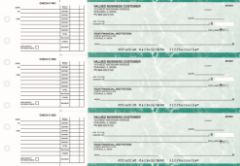
Pre-printed AP checks from Checkomatic: MICR encoding is verified at the manufacturing facility before shipping. No printer, toner, or software required from the buyer.
When Does In-House Check Printing Make Operational Sense?
In-house MICR check printing tends to suit businesses that:
- Already own a compatible MICR printer and check printing software
- Print at high enough monthly volume that hardware and setup overhead is spread across many checks
- Operate multiple bank accounts and benefit from using one blank stock inventory across all of them
- Need on-demand printing capability without depending on order turnaround time
- Have operational or geographic reasons that make same-day in-office print-and-distribute preferable
For businesses starting from scratch that do not own MICR equipment, the setup investment , hardware, toner, software configuration, and ongoing maintenance , requires a realistic assessment of monthly volume and operational bandwidth before committing. The only reliable way to evaluate whether in-house printing fits your operation is to map out what your specific setup would involve, including labor, and compare it to what ordering pre-printed checks would require instead.
For pricing on pre-printed checks at different quantities, see how much do business checks cost.
What Does Checkomatic Offer for Business Check Printing?
Checkomatic manufactures pre-printed business checks, payroll checks, computer checks, and blank check stock in-house at its Monroe, NY facility since 1997. Every pre-printed order is printed on CPSA-certified security paper with ABA-compliant MICR encoding verified against the Federal Reserve E-Payments Routing Directory before printing. Six ABA-compliant security features are included as standard on every order.
For businesses that choose in-house printing, Checkomatic also offers blank check stock in check-on-top, check-in-middle, check-on-bottom, and 3-on-a-page formats compatible with QuickBooks, Quicken, Sage, and other accounting software. See blank checks for the full blank stock range and check stock paper for security and MICR specifications.
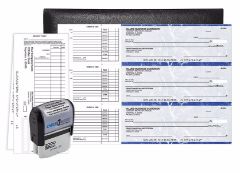
Checkomatic's manual starter pack: a practical way to evaluate pre-printed check quality before committing to a larger order quantity.
For the full range of pre-printed formats, see business checks, computer checks, manual business checks, and business payroll checks. For ordering guidance, see how to order checks and how to order checks online. For common questions, see business checks FAQs and are business checks safe.
What Customers Say About Checkomatic
All reviews below are reproduced verbatim from checkomatic.com. Source: checkomatic.com/quickbooks-starter-pack-product, 4.5 stars from 166 verified reviews.
"Been with them for 15 years. Always reliable, always good quality, good service. What more can you ask for?"
"We use CheckoMatic for all of our check needs! They have great prices and we receive our products in a timely manner!"
"ASJ Wilson Construction has been a client of checkomatic for some years now and they've never disappointed this company. Thank you checkomatic for all that you do."
"First time ordering and I am super impressed with the quality of the checks. No issues with delivery. I will be ordering again!"
"Affordable and efficient. My go-to business check printer."
"I got 500 checks for less than half of what the bank wanted for 200!"





