


Why Construction Companies Depend on Business Checks
Construction is one of the most check-dependent industries in the US economy. General contractors and trade contractors write checks to subcontractors on every project, to material suppliers on every delivery order, to equipment rental companies on every mobilization, and to their own workers on every pay period. Electronic payment adoption in construction has grown, but checks remain the dominant payment method for subcontractor disbursements, particularly for smaller and mid-size subcontractors who are not set up to receive ACH or wire transfers from every GC they work with.
The reasons construction relies on checks are practical. A check provides a physical remittance document that travels with the payment. The stub carries the project name, invoice number, draw number, and any retainage details. The subcontractor's accounts receivable team knows exactly what was paid and why without a separate phone call or email. A wire or ACH transfer settles the same dollar amount but delivers no remittance data, requiring the subcontractor to match the incoming deposit to an open invoice manually.
Beyond payment documentation, checks provide stop payment protection that construction companies need when disputes arise mid-project. If a subcontractor abandons work, delivers defective materials, or fails to perform, a check not yet deposited can be stopped. A wire sent the same day cannot be recalled. This reversibility makes checks the operationally safer payment instrument for the complex, long-duration payment relationships that construction projects involve.
Paying Subcontractors by Check
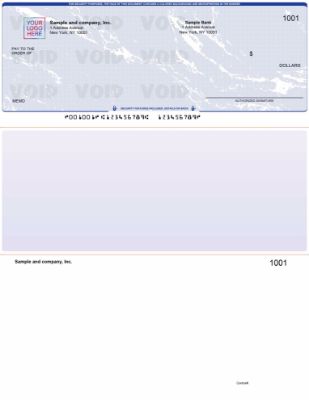
AP business checks from Checkomatic , voucher stub format for subcontractor payments, carrying project name, invoice number, and payment detail for your AP records.
Paying subcontractors by check is the standard practice for most general contractors. The check is made out to the subcontractor's legal business name exactly as it appears on the subcontract. The memo line or check stub carries the project name, draw number or invoice number, and any retainage held back from the payment.
What to Record on a Subcontractor Check Stub
A voucher check with two stubs is the most useful format for subcontractor payments. One stub goes to the subcontractor with the check. That stub carries enough detail for the subcontractor's accounts receivable team to match the payment to their invoice and close the open item. The second stub stays in your AP files as your record of the disbursement. For each subcontractor payment, the stub should note:
- Project name and address
- Invoice number or draw request number
- Gross invoice amount
- Retainage held (if any, expressed as dollar amount and percentage)
- Net payment amount
- Any deductions for back charges or credits applied
Retainage and Partial Payment Checks
Construction contracts typically allow the general contractor to withhold a retainage percentage (commonly 5 to 10 percent) from each subcontractor payment until project completion or substantial completion. This means the check amount is almost never equal to the invoice amount. Documenting retainage clearly on every check stub prevents disputes at project closeout when the subcontractor submits a final retainage draw. A clear paper trail of every draw payment, with retainage withheld and retainage balance noted, is worth far more than any savings from simplifying your check format.
Payroll Checks for Construction Workers
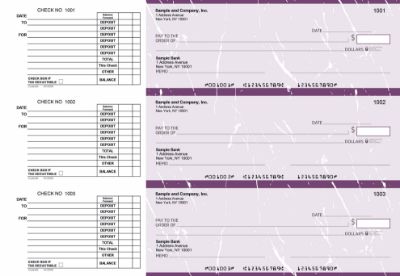
Payroll business checks from Checkomatic , earnings stub with hours worked, pay rate, gross pay, and deductions for construction workers on hourly and prevailing wage projects.
Construction payroll is typically the most complex payroll calculation in any industry. Workers perform multiple classifications of work on the same day. Hours shift between regular time, overtime, and double time. Apprentices and journeymen work side by side at different pay rates. Fringes, benefits, and deductions vary by labor agreement or project requirement. The payroll check and its stub must carry enough detail to document what was paid and why.
What a Construction Payroll Check Stub Needs to Show
For construction workers paid by the hour, the earnings stub on each paycheck should show:
- Pay period start and end dates
- Regular hours worked at the base rate
- Overtime hours worked (at 1.5x or 2x rate where applicable)
- Work classification or trade (carpenter, electrician, laborer, operator, etc.)
- Gross pay before deductions
- Federal income tax withheld
- State income tax withheld
- Social Security and Medicare (FICA) deductions
- Any fringe benefit deductions or contributions
- Net pay matching the dollar amount on the check
For the complete payroll check guide and format options, see business checks for payroll: the complete employer guide.
Prevailing Wage Compliance and Certified Payroll
Construction companies working on federally funded or state-funded public works projects are subject to prevailing wage laws that require payment of the prevailing wage rate for each work classification in the project location. The Davis-Bacon Act governs federal projects. Many states have their own prevailing wage statutes that apply to state-funded projects.
What Certified Payroll Requires
Contractors on prevailing wage projects must submit a certified payroll report to the awarding agency for each pay period. This report lists every employee who worked on the project, their work classification, hours worked, the prevailing wage rate paid, deductions taken, and net pay. The payroll check and its stub are the source documents for this report. If you print payroll checks from QuickBooks or your payroll software, the software generates the certified payroll report from the same data that printed the check, making compliance documentation automatic.
Why Your Check Stub Format Matters for Prevailing Wage
Computer payroll checks in voucher format that print earnings detail from your accounting software produce certified payroll documentation automatically. Each paycheck's stub shows the classification, hours, rate, gross pay, and deductions in the same format your certified payroll report uses. Manual payroll checks require handwriting all of this detail on each stub for each employee, which is time-consuming at scale and creates room for transcription errors in the certified payroll report.
Field Checks for On-Site Payments
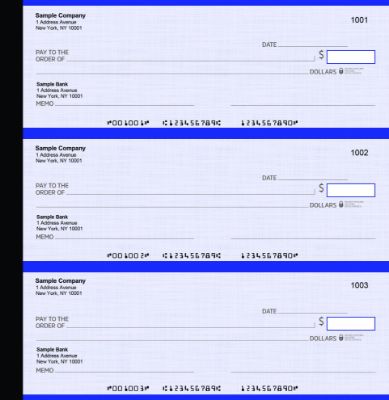
Manual executive deskbook checks from Checkomatic , the portable field check format for general contractors writing payments on job sites, at inspections, or at project meetings.
Not all construction payments happen at a desk. General contractors write checks at project kickoff meetings, at permit inspections, at material delivery acceptance, at equipment mobilization, and at project closeout walkthroughs. Pulling out a laptop and running a check print job is not practical on a job site.
Manual Checks for Field Use
Manual business checks in a binder or executive deskbook format solve this problem. The check binder fits in a briefcase or truck cab. You write the check by hand, tear it out, hand it to the payee, and note the payment in the stub. The pre-printed company name, address, and banking details are already on the check , the only thing you write is the payee name, amount, date, memo, and your signature. No printer, no software, no alignment issues.
When Field Checks Make Sense on a Construction Project
- Paying a day laborer or temporary worker at the end of a shift
- Writing a deposit check to a material supplier at the time of order
- Paying a permit or inspection fee at a government office
- Issuing a subcontractor draw payment at a project meeting
- Settling a small invoice with a local vendor or equipment rental on the spot
- Writing a final payment at a project closeout walkthrough
For the full range of manual check formats including binder, pocket, and 3-on-a-page options, see manual checks.
Which Check Format Fits a Construction Company
The right format depends on where and how you write checks. Most construction companies benefit from two formats used in different situations.
Computer Checks in Voucher Format , For Office AP and Payroll
If your office uses QuickBooks, Sage, or another accounting platform to manage AP and payroll, computer checks in check-on-top voucher format are the right choice for office-based payments. The check prints at the top of the sheet with two stubs below it. Your software fills in the payee, amount, date, check number, and any memo or remittance detail at print time. One stub goes to the subcontractor or employee. The second stub stays in your files. For the computer check range compatible with QuickBooks and major accounting platforms, see computer checks. For QuickBooks-specific formats, see QuickBooks checks. For all accounting software formats, see software compatible business checks.
Manual Checks in Binder Format , For Field Payments
For payments written at job sites, inspections, or project meetings, manual business checks in a binder format are the most practical option. No printer, no software, no alignment setup. Pre-printed with your company name, address, and banking details. You write only the variable payment information. Available in three-on-a-page format for high-volume handwritten AP payments and in pocket or deskbook format for portable field use. For the full manual range, see manual checks. For the 3-on-a-page AP format specifically, see manual 3-on-page accounts payable checks.
Multi-Purpose Manual Checks With Dual Signature
Some construction companies require dual authorization on outgoing payments above a certain dollar amount. The project owner, controller, or CFO must co-sign checks that exceed the project manager's single-signer limit. Dual signature checks include two signature lines on the face of the check. Both authorized signers must sign before the check is valid for bank processing. This is a common financial control for construction companies with multiple projects running simultaneously. For the multi-purpose manual format with dual signature support, see multi-purpose manual business checks.
Construction Check Format Comparison Table
| Format | Best Construction Use | Requires | Stub Detail | Link |
|---|---|---|---|---|
| Computer check on top (voucher) | Office AP to subcontractors and suppliers | Printer + accounting software | 2 stubs , invoice, job cost, retainage | Computer checks |
| Payroll computer check | Employee payroll , hourly, overtime, classified work | Printer + payroll software | Earnings stub with hours, rate, gross, net | Payroll checks |
| Manual 3-on-a-page | High-volume handwritten AP at office | No printer or software | Handwritten stub; carbon copy available | Manual AP checks |
| Manual binder/deskbook | Field payments at job sites and meetings | No printer or software , portable | Handwritten stub | Manual checks |
| Multi-purpose with dual signature | High-value payments requiring dual authorization | No printer or software | Two signature lines pre-printed | Multi-purpose checks |
1099-NEC Recordkeeping for Subcontractor Checks
Construction companies that pay subcontractors as independent contractors are required by the IRS to issue a 1099-NEC to any subcontractor paid $600 or more in a calendar year. Your check records are the primary source for calculating annual payments per subcontractor. This is one of the most practical reasons to maintain a clean, complete check register for your business checking account.
How Your Check Register Supports 1099 Compliance
Every subcontractor payment check you write creates a record: the payee name, the date, and the amount. If you use accounting software for check printing, the software maintains a running total of payments to each payee. If you write manual checks, your check register carries the same information provided you record every payment promptly and completely.
At year end, you extract total payments per subcontractor, identify which individuals and businesses received $600 or more, and issue 1099-NEC forms by January 31. Your check register is the audit trail that supports these totals. A missing check entry, a transposed amount, or an incomplete payee name can create a mismatch between what you report on the 1099 and what the subcontractor reports as income , a discrepancy that may trigger IRS attention for both parties.
Check Fraud Protection for Construction Companies
Construction companies write high-value checks. A subcontractor draw payment for a mid-size project can easily run $50,000 to $500,000. These check amounts make construction AP a high-value target for check fraud, particularly check washing , the practice of chemically removing ink from a mailed check and rewriting the payee and amount.
Why Check Washing Is a Risk for Construction AP
Subcontractor payments are frequently mailed. A check mailed to a subcontractor travels through the postal system and may sit in a business mailbox before being collected. If intercepted, a check printed on low-quality paper without chemical-reactive security features can be washed and rewritten without visible evidence of tampering. The altered check clears the bank. The construction company has no recourse once funds have left the account.
Security Features on Every Checkomatic Business Check
Every Checkomatic business check includes the following security features as standard on every order:
- Chemical-reactive paper: Stains visibly when washing solvents are applied, revealing any alteration attempt before the check is processed.
- Microprint signature line: Appears as a thin line but is actually tiny repeating text that blurs on any photocopy, flagging reproductions.
- Void pantograph: Background pattern that makes VOID appear when the check is photocopied or scanned.
- Heat-sensitive ink: Disappears when pressed with a warm thumb , an authenticity test bank tellers apply to suspicious checks.
- Coin-reactive ink: Changes appearance when rubbed with a hard metal object.
- True watermark: Visible from both sides under light , absent from counterfeits printed on plain paper.
For the complete security feature guide and fraud protection strategies, see are business checks safe: security features that actually matter. For bank-side fraud protection that matches every presented check against your issued check list, see what is positive pay and how does it work.
How to Order Business Checks for Your Construction Company
What to Have Ready Before Ordering
- Your company's legal name: Exactly as registered with your state and your bank. The name on the check must match the business bank account registration.
- Your company address: The address registered to the business checking account.
- Your bank's ABA routing number: Nine digits from the lower-left of an existing check. Not from a routing lookup site , use the number from an existing check on the same account.
- Your checking account number: From an existing check or your online banking account details.
- Starting check number: One higher than the last check you used. For computer and manual formats running in parallel, assign separate sequential ranges.
- Your company logo: Black and white logo printing is free on every Checkomatic order. Color logo printing is available as an add-on.
- Dual signature preference: If your company policy requires two signatures on checks above a threshold, specify this at checkout.
Quantity for Construction Companies
Construction companies typically write more checks per month than most businesses , particularly during active project cycles when multiple subcontractor draws, supplier invoices, and weekly payroll runs happen simultaneously. A construction company writing 50 to 100 checks per month will go through a 500-check order in 5 to 10 months. Ordering 1,000 at a time reduces the per-check cost and extends the supply through most project cycles without risking holding outdated stock if your banking details change. For complete ordering guidance, see business checks.
What Customers Say About Checkomatic
All reviews below are published on checkomatic.com and reproduced verbatim. Source: checkomatic.com/quickbooks-starter-pack-product, 4.5 stars from 166 verified reviews.
"ASJ Wilson Construction has been a client of checkomatic for some years now and they've never disappointed this company. Thank you checkomatic for all that you do."
ASJ Wilson Construction | ★★★★★ 5/5 | June 6, 2024 | Source: checkomatic.com/quickbooks-starter-pack-product
"Been with them for 15 years. Always reliable, always good quality, good service. What more can you ask for?"
ATV Inc. | ★★★★★ 5/5 | April 5, 2024 | Source: checkomatic.com/quickbooks-starter-pack-product
"First time ordering and I am super impressed with the quality of the checks. No issues with delivery. I will be ordering again!"
TClinton | ★★★★★ 5/5 | April 9, 2025 | Source: checkomatic.com/quickbooks-starter-pack-product
"We use CheckoMatic for all of our check needs! They have great prices and we receive our products in a timely manner!"
CG's Tax Service | ★★★★★ 5/5 | September 18, 2024 | Source: checkomatic.com/quickbooks-starter-pack-product
"I got 500 checks for less than half of what the bank wanted for 200!"
VVA Voucher Checks (Vietnam Veterans of America) | ★★★★★ 5/5 | July 6, 2024 | Source: checkomatic.com/quickbooks-starter-pack-product
"Affordable and efficient. My go-to business check printer."
Doe | ★★★★★ 5/5 | January 24, 2025 | Source: checkomatic.com/quickbooks-starter-pack-product
Why Choose Checkomatic for Construction Company Business Checks
Both Formats for Every Construction Payment Situation
Computer checks for office-based AP and payroll. Manual checks for field payments at job sites. Both from Checkomatic, both manufactured to the same ABA quality standard, both with the same security features, and both compatible with the same business checking account. Browse all formats at business checks, computer checks, and manual checks.
Voucher Stubs for Construction AP Documentation
Every computer check and 3-on-a-page manual check from Checkomatic includes stub space for the detail that construction AP documentation requires: payee, payment amount, project reference, and any memo or invoice notation. For the AP check format specifically designed for subcontractor and vendor payments, see manual 3-on-page accounts payable checks.
Dual Signature at No Extra Charge
Construction companies that require dual authorization on outgoing payments can add the dual signature line to any manual check order at checkout at no additional cost. For multi-purpose manual checks with dual signature support, see multi-purpose manual business checks.
All Security Features on Every Order
Chemical-reactive paper, microprinting, void pantograph, heat-sensitive ink, coin-reactive ink, and true watermark are included on every Checkomatic business check at the base price. For a construction company writing high-value subcontractor checks, these features are not optional extras. For the complete security feature guide, see are business checks safe: security features that actually matter.





