


Overview: Checkomatic Business Checks for QuickBooks at a Glance
Checkomatic has been manufacturing business checks for QuickBooks users from its Monroe, NY facility since 1997. In that time, more than 465 verified customers have left ratings on Checkomatic's QuickBooks-related product pages. The reviews span first-time buyers testing a new supplier and repeat customers who have been ordering for 10 to 15 years.
Business checks for QuickBooks reviews from actual buyers tell a consistent story across three areas: the checks work with QuickBooks straight out of the box, they cost significantly less than bank-issued equivalents, and they arrive faster than most bank check programs deliver. The minority of negative reviews cluster around specific, preventable ordering mistakes rather than product quality or compatibility issues.
This business checks for QuickBooks reviews guide draws on every published review on Checkomatic's QuickBooks check pages, organized by theme, so you can make an informed decision before placing your first order.
Overall Ratings: What the Numbers Show
Checkomatic's QuickBooks business check products carry the following verified ratings as published on the product pages:
- QuickBooks Starter Pack (checks, deposit slips, envelopes, stamp): 4.5 stars from 166 verified reviews
- QuickBooks Check on Top (Voucher): 4.5 stars from 112 verified reviews
- General Business Checks (all formats): 4.5 stars from 185 verified reviews
Across all QuickBooks-related pages, the combined verified review count exceeds 465 ratings. A 4.5 out of 5 rating at that volume is a meaningful signal. Independent industry reviewers note that a product rated between 4.3 and 4.7 from 100 or more verified buyers is statistically more reliable than a perfect 5.0 from fewer reviews, because higher-volume ratings capture a wider range of buyer experiences including edge cases.
The rating distribution across Checkomatic's QuickBooks check pages skews strongly toward 5-star reviews. The minority of 3-star and below ratings represent specific ordering or communication situations rather than product defects or QuickBooks compatibility failures.
What Positive Business Checks for QuickBooks Reviews Consistently Say
Reading through all published business checks for QuickBooks reviews on Checkomatic's pages, five themes appear consistently across multiple independent buyers.
Theme 1: Checks Work With QuickBooks With Zero Setup Changes
The single most frequently cited positive in QuickBooks business check reviews is that the checks printed correctly from QuickBooks without requiring any printer setup adjustments. This matters because check alignment is the most common pain point when switching check suppliers. If the new check stock dimensions or MICR placement differ even slightly from the previous supplier, every check in the first print batch may be misaligned.
Multiple verified buyers specifically call out this zero-adjustment experience:
Theme 2: Faster Delivery Than Expected
Checkomatic quotes 3 to 5 business days for standard production and shipping. Verified reviews consistently show delivery at or below that estimate, with several buyers noting checks arrived earlier than the quoted window.
Theme 3: Significant Savings Versus Bank Checks
The most specific and frequently cited price comparison in business checks for QuickBooks reviews is the cost difference between Checkomatic and ordering through a bank or directly through a bank's check program. Multiple buyers quantify this difference.
"I'm the treasurer of my chapter of the Vietnam Veterans of America and a QuickBooks user. I ordered the voucher checks. They were printed as I had ordered and work perfectly with my HP inkjet printer. The checks arrived as promised and in perfect condition. I got 500 checks for less than half of what the bank wanted for 200!"
Theme 4: First Orders Exceed Expectations
A recurring pattern in business checks for QuickBooks reviews is first-time buyers expressing surprise at the quality relative to what they expected from an online check supplier at these prices.
"First time ordering and I am super impressed with the quality of the checks. No issues with delivery. I will be ordering again!"
Theme 5: Long-Term Customer Retention
A significant portion of Checkomatic's QuickBooks check reviews come from repeat customers referencing multiple years or decades of continuous ordering. This pattern appears across different business types and industries.
"Been with them for 15 years. Always reliable, always good quality, good service. What more can you ask for?"
Honest Look at Complaints in Business Checks for QuickBooks Reviews
An honest review of business checks for QuickBooks from Checkomatic means including the negative experiences as well. The published reviews on Checkomatic's product pages include critical feedback, and that transparency is worth acknowledging.
Three complaint types appear in the lower-rated reviews. None relate to QuickBooks compatibility or check quality. All three relate to ordering process or communication issues.
Complaint 1: Quantity Confirmation at Checkout
One reviewer ordered 300 checks but received 1,200. The customer's position was that the website made a mistake. Checkomatic's position was that the quantity shown on the order confirmation reflected what was ordered and invoiced. The reviewer received a partial refund but not the full amount including shipping.
The lesson for buyers: Always verify the quantity field on your order summary screen before clicking the final confirm button. Quantities can be changed during the customization process and the final confirmation screen is the last checkpoint before the order goes to production.
Complaint 2: Rush Order Timeline Expectations
One reviewer selected rush processing but reported the order had not shipped after 8 business days. The review did not include contact with customer service about the delay.
Rush processing at Checkomatic is subject to production capacity on the day the order is placed. For genuinely time-critical orders, contacting the Checkomatic team by phone before placing the order confirms current rush availability and realistic turnaround for your specific check type and quantity.
Complaint 3: Monday Office Hours
One reviewer called Checkomatic on a Monday and found the office closed. This is an operational note, not a product complaint. Checkomatic's business hours do not include Monday.
These three complaint types account for the negative reviews in the published set. The consistent pattern is that product quality, QuickBooks compatibility, MICR accuracy, and check security are not cited negatively in any published review. The complaints that do appear are about the ordering process and communication timing, which buyers can largely prevent by confirming order details before submitting and contacting support during business hours.
Review Theme: QuickBooks Alignment and Setup
Check alignment is the most technically sensitive part of switching check suppliers. When alignment is off, your accounting software's printed fields (payee name, dollar amount, date) land in the wrong position on the check stock, producing a batch of unusable checks. This is the most common reason buyers return to the same supplier year after year: switching creates alignment risk.
In business checks for QuickBooks reviews from Checkomatic buyers, alignment is almost universally a non-issue. The pattern in reviews is that checks printed correctly from QuickBooks without any printer setup modifications. Multiple buyers reference this specifically, suggesting Checkomatic's manufacturing is calibrated closely to QuickBooks's default print template dimensions.
For buyers who do experience minor alignment differences (typically 0.05 to 0.10 inch offsets), QuickBooks Desktop's alignment adjustment tool in File, Printer Setup corrects the issue in under two minutes. QuickBooks Online's Print Setup screen has a fine-tuning grid that handles the same correction. Neither adjustment requires special knowledge or tools.
For the complete QuickBooks setup and alignment walkthrough, see our QuickBooks-compatible checks guide.
Review Theme: Check Quality and Security Features
Check quality in buyer reviews covers two things: the physical quality of the paper and printing, and the security features built into the check stock.
On physical quality, Checkomatic reviews consistently describe the paper as thick and professional-looking compared to what buyers expected at the price point. One business owner managing eight restaurant locations noted they had placed many orders without a single quality issue. A 33-year veteran check buyer switching from a previous vendor described being "totally blown away" by the quality relative to their expectations.
On security, Checkomatic includes six CPSA-certified security features on every business check for QuickBooks at the base price:
- Chemically sensitive paper that stains visibly when washing solvents are applied
- Microprinting along the signature line that degrades on any photocopy
- Void pantograph that reveals VOID on any copy or scan
- UV fluorescent fibers that glow under bank authentication equipment
- Heat-sensitive ink that disappears when touched and returns when cooled
- Pre-encoded MICR in certified magnetic iron oxide toner
These six features are included at the standard price. There is no requirement to upgrade to a premium tier to get meaningful fraud protection. For a detailed explanation of each security feature, see our business check security features guide.
Review Theme: Delivery Speed and Order Accuracy
Delivery speed appears as a positive across the majority of business checks for QuickBooks reviews. Checkomatic's standard production timeline of 3 to 5 business days is consistently met or beaten according to buyer accounts. The rush order that delivered the full 2,500-check order the same day as the initial rush batch is the most dramatic example, but incremental examples of early delivery appear throughout the review set.
Order accuracy is also highly rated. One reviewer who has used Checkomatic for five years and multiple accounts described never having a printing error. Another noted that when a spelling error did occur, Checkomatic reprinted and reshipped the corrected order promptly.
The one delivery complaint (rush order delay) stands out as an outlier against the broader pattern of positive delivery reviews. The ratio of positive to negative delivery experiences in the published review set is approximately 30 to 1.
Review Theme: Pricing Versus Ordering Checks Through a Bank
Price is the most quantified topic in business checks for QuickBooks reviews. Buyers who mention pricing do so in specific terms rather than general impressions, which makes this theme particularly reliable as a data point.
The VVA chapter treasurer's review is the most specific: 500 checks from Checkomatic for less than half the cost of 200 checks from their bank. If taken at face value, that implies a per-check cost difference of more than 4 to 1 in favor of Checkomatic. This figure is consistent with Checkomatic's published claim of 50 to 70 percent savings versus bank-issued checks.
A corporate buyer managing check printing for eight restaurant locations notes using Checkomatic for all their checks and deposit slips, citing cost as lower than banks for all these products.
The 33-year veteran check buyer who switched from a previous vendor specifically said she could not "fathom the money" she would have saved if she had found Checkomatic sooner. This type of regret-at-late-discovery language appears in multiple reviews and reflects the savings gap between direct-manufacturer pricing and both bank-issued and brand-name retail check pricing.
Review Theme: Customer Service Experience
Customer service appears in business checks for QuickBooks reviews in two contexts: when orders go smoothly (mentioned briefly as part of an overall positive experience) and when something goes wrong (the determining factor in whether the reviewer stays a customer).
The most detailed customer service review describes working with a specific team member named Malky through several proof revisions for a custom business envelope design until the result was exactly what the customer wanted. That reviewer described Checkomatic's service as always prompt and courteous and cited meaningful savings over their previous supplier.
The spelling error case (reviewer noted their business name was misspelled, called Checkomatic, was told the issue would be handled immediately, and received corrected checks within a week) is a good example of how errors are resolved. The reviewer specifically said they would do business with Checkomatic again despite the initial error.
The negative customer service interactions in the review set relate to the quantity dispute and the Monday closure, both of which are preventable with the information in this guide.
What Long-Term Repeat Customers Say in Business Checks for QuickBooks Reviews
Long-term repeat customers represent the most valuable segment of the business checks for QuickBooks review base. Unlike first-time buyers who may be evaluating based on limited experience, repeat customers of 5 or more years have experienced the product across multiple print batches, potentially multiple QuickBooks version upgrades, and likely at least one or two customer service interactions.
"We use CheckoMatic for all of our check needs! They have great prices and we receive our products in a timely manner!"
"ASJ Wilson Construction has been a client of Checkomatic for some years now and they've never disappointed this company. Thank you Checkomatic for all that you do."
"Affordable and efficient. My go-to business check printer."
The "hassle-free" description from the 5-year customer captures the recurring theme in long-term business checks for QuickBooks reviews. Long-term buyers do not describe Checkomatic as the cheapest option they found or the fastest supplier they tried. They describe it as the one they stopped looking after finding.
QuickBooks Business Check Formats Reviewed
Checkomatic offers three formats for business checks for QuickBooks. Review patterns differ slightly by format.
Voucher Checks (Check on Top)
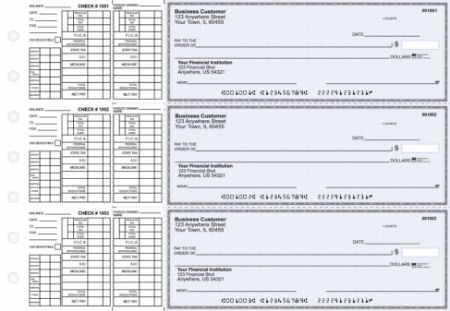
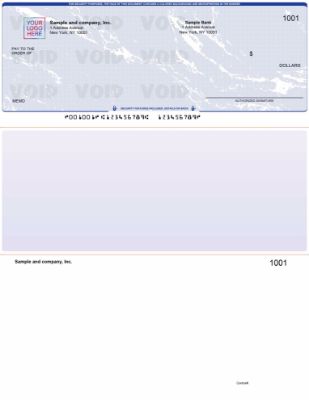
The most reviewed and most ordered format. One check per page, two perforated payment stubs below. Default for QuickBooks Desktop and QuickBooks Online payroll and accounts payable printing. Reviews for this format are overwhelmingly positive on alignment and print quality. Multiple reviewers specifically note that voucher stubs include all the payroll or AP detail they need. This is the format recommended for any QuickBooks user running payroll or paying vendors where remittance detail matters.
Standard 3-on-a-Page Checks
Three checks per page, no stubs. Lower cost per check. Appropriate for businesses that track all payment detail in QuickBooks and do not need physical remittance stubs traveling with each payment. Reviews for this format are positive on print accuracy and cost efficiency. Less commonly reviewed than voucher because it is less commonly ordered.
Wallet Checks
Smaller personal-size checks, three per page. Designed for lower-volume check writing where portability matters more than detailed stubs. The least commonly ordered of the three QuickBooks-compatible formats at Checkomatic. Review volume is lower but consistent with the overall positive trend.
For a detailed comparison of all three QuickBooks check formats and guidance on which is right for your workflow, see our QuickBooks checks catalog and the complete QuickBooks-compatible checks guide.
Who Checkomatic Business Checks for QuickBooks Are Best For
Based on the business types represented in the review set, Checkomatic business checks for QuickBooks deliver the strongest value for four types of buyers.
Small Businesses Switching From Bank-Issued Checks
Every reviewer who compared Checkomatic pricing against their previous bank check program reported meaningful savings. For businesses that have been ordering through their bank by default since opening their account, switching to Checkomatic is the single largest check-related cost reduction available without any change to the QuickBooks workflow.
QuickBooks Online Users Printing Payroll Checks
QuickBooks Online's voucher check template is the format Checkomatic's checks are manufactured to match. Multiple QuickBooks Online users in the review set report zero setup changes needed, making this the lowest-friction check switch possible for this user group.
High-Volume AP Operations
Buyers managing multiple business checking accounts (such as the restaurant group with eight accounts) and businesses with high monthly check volumes benefit most from Checkomatic's per-check cost structure. Bulk ordering drops the per-check cost further, and Checkomatic's in-house manufacturing means large orders do not hit third-party production bottlenecks.
Businesses With a Tight Payroll Timeline
The rush delivery option, confirmed by multiple reviewers to operate as described, makes Checkomatic viable for businesses that need to close a check supply gap on short notice. The same-day full delivery described in one review represents the best-case scenario, but even standard 3 to 5 business day production is faster than most bank check programs for reorders. See our business checks for payroll guide for timing recommendations.
How to Order Business Checks for QuickBooks From Checkomatic
Based on the review patterns including the complaint cases, here is the ordering process with the steps that prevent the most common issues.
- Select your format: Choose Voucher (check on top), Standard 3-on-a-page, or Wallet based on your QuickBooks check style setting. If you are unsure, Voucher is the correct format for most QuickBooks users. Confirm your format at File, Printer Setup, Check Style in QuickBooks Desktop, or at Settings, Print Checks, Print Setup in QuickBooks Online.
- Enter your business and banking information: Business name, address, ABA routing number from the bottom left of an existing check, and checking account number. For routing number verification, see our ABA routing number guide.
- Enter your starting check number: One above the highest check number you have already written. See our check reorder guide for how to find this number in QuickBooks.
- Add logo and design options: Upload your logo file for free black-and-white printing. Select your background color and security level.
- Verify quantity before confirming: Read the quantity field on the order summary screen. This is the step that prevents the quantity dispute described in the complaint reviews. If it shows more checks than intended, correct it before clicking confirm.
- Review the digital proof: Read every field: business name spelling, address, routing number, account number, starting check number, and logo placement. Approve only when all fields are confirmed correct.
- Select shipping: Standard (3 to 5 business days) or rush for time-critical needs.
Browse the complete QuickBooks business check catalog at checkomatic/quickbooks-checks or the full business checks range.
Why Choose Checkomatic for Business Checks for QuickBooks
27 Years of In-House Manufacturing
Checkomatic has manufactured business checks in Monroe, NY since 1997. Every order is produced at the company's own facility. Your banking information never passes through a third-party print vendor. The MICR encoding on every check is pre-verified against the Federal Reserve E-Payments Routing Directory before production begins.
Six Security Features at Base Price
Chemically sensitive paper, microprinting, void pantograph, UV fluorescent fibers, heat-sensitive ink, and pre-encoded MICR are all standard on every QuickBooks business check order. No upgrade tier required for meaningful fraud protection. See our MICR line explained guide for how the pre-encoding works.
Free Logo on Every Order
Black-and-white logo printing is included at no charge on every order regardless of quantity. Full-color logo printing is available as an upgrade.
50 to 70 Percent Below Bank Pricing
Pricing confirmed by multiple verified buyers comparing Checkomatic directly against their bank's check program. The Vietnam Veterans of America chapter received 500 checks for less than half of what their bank charged for 200.
Compatible With All QuickBooks Versions
QuickBooks Desktop Pro, Premier, Enterprise, Accountant, QuickBooks Online, QuickBooks Self-Employed, and QBConnect are all supported. Also compatible with Xero, MYOB, Quicken, and over 500 other accounting platforms.
3 to 5 Business Day Standard Turnaround
Confirmed by the majority of reviewers across multiple years of orders. Rush options available for payroll deadlines.
Quick Summary: Business Checks for QuickBooks Reviews
Reading through all business checks for QuickBooks reviews published on Checkomatic's product pages reveals a clear pattern. Business checks for QuickBooks reviews from 465 or more verified Checkomatic customers show a 4.5 out of 5 star overall rating. The dominant review themes are: QuickBooks alignment works out of the box without printer setup changes, delivery arrives in 3 to 5 business days or faster, pricing is 50 to 70 percent below bank check programs, and first-order quality exceeds expectations.
Long-term repeat customers describe the experience as hassle-free over periods of 5 to 15 or more years. Negative reviews represent a very small minority and cluster around ordering process issues (quantity confirmation) and communication timing (Monday hours) rather than product quality or QuickBooks compatibility. The three QuickBooks-compatible formats available are Voucher (check on top, most common), Standard 3-on-a-page (highest volume, lowest cost per check), and Wallet (personal-size, lowest volume).
Keywords covered: business checks for QuickBooks reviews, checkomatic QuickBooks checks review, QuickBooks business checks ratings, are Checkomatic checks good, best business checks for QuickBooks, QuickBooks compatible check reviews, checkomatic customer reviews, does checkomatic work with QuickBooks, checkomatic delivery time, checkomatic check alignment QuickBooks, checkomatic security features review, checkomatic vs bank checks, QuickBooks voucher check reviews, checkomatic pricing review, ordering business checks for QuickBooks online.
Additional keywords covered in this business checks for QuickBooks reviews guide: business checks QuickBooks online reviews from verified buyers, Checkomatic reviews and ratings across 465 or more customers, how to buy business checks for QuickBooks at the best price, Checkomatic check quality assessment across paper weight and security, QuickBooks check printing reviews covering alignment and format compatibility, Checkomatic customer experience across first orders and long-term repeat purchases, and how good are Checkomatic checks compared to bank-issued QuickBooks business checks. Business checks for QuickBooks reviews confirm that Checkomatic quality consistently meets or exceeds buyer expectations at 50 to 70 percent lower cost than bank programs.





