


Handy software will ensure that all areas of the check are filled out before you hit the print button. Plus it will all be typed out so that all you have to do is sign the bottom of the check. With the process so easy, you will never have to tear up a check because of a mistake on your part ever again. The computer checks will run through an inkjet or laser printer.
If you're writing a bunch of checks all at once, you can load a pile of checks into the printer so that your life is easier. You can enter all the data through your computer program and then hit print when they're all ready to go. Then you just sign and put them all into envelopes.
Depending on your computer program, you can use computer checks to pay all of your bills without doing much at all. If you pay some bills on a regular basis, the program will auto-generate the information on the checks. Then all you need to do is look the information over and hit print. The process cannot become any more simplified. Computers were made to make your life easier and so were computer checks.
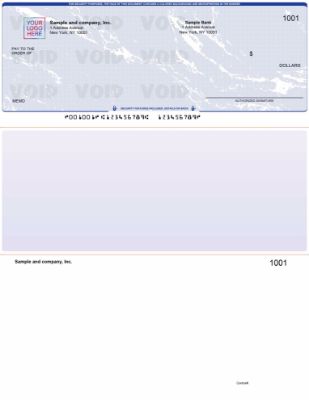
You can decide how many checks you want on a single page. One check to a page will give you room to make notes, write details out for employee checks or even give the vendor a little extra information. You can also get three to a page if you don't need any details and just need to mail off a check for something.
Paying bills is one of those things that you have to do. It doesn't have to be a complicated process, though. Computer checks are easy because they do most of the work for you. They're pre-printed with all of your bank information. Then when they go through the printer they have everything else on them, too. When you need to pay bills, you don't have to handwrite them anymore.
Instead, computer checks will generate most everything for you so that you just need to sign the bottom and hand them off or mail them out.
Browse the full range of computer checks for business at Checkomatic, manufactured in Monroe, NY since 1997.
How Computer Checks Work Step by Step
The original content explains the key benefit well. Here is the complete step-by-step process so you can see exactly how computer checks are generated easier than handwritten checks from start to finish.
Step 1: Order Pre-Printed Computer Check Stock
Computer check stock arrives from the manufacturer with your business name, address, bank name, ABA routing number, and account number already printed. The check number is also pre-printed in sequence. This pre-printed information is fixed , it is the same on every check in the batch. The manufacturer verifies the routing number before printing to ensure bank compatibility.
Step 2: Record the Payment in Your Accounting Software
In QuickBooks or your accounting platform, record the payment by selecting the payee from your vendor or employee list, entering the amount, choosing the payment account, and selecting the date. The software stores this information as a pending check. For recurring payments, the software auto-populates the amount and payee from previous payments, which is the auto-generate feature the original content describes.
Step 3: Load Check Stock Into Your Printer
Load your pre-printed check stock into your laser or inkjet printer tray. The orientation (face-up or face-down, long-edge or short-edge feed) depends on your printer model. Most laser printers feed face-down. Confirm the correct orientation in your printer settings before running a full batch.
Step 4: Click Print
In your accounting software, send the check to print. The software prints the variable fields (payee name, amount in numbers and words, date, and memo) in the correct positions on the pre-printed form. The MICR line at the bottom, which already carries your routing and account number from pre-printing, is complete. The check is fully printed except for your signature.
Step 5: Review, Sign, and Mail
Review the printed check against the accounting record. Confirm payee, amount, and date. Sign the signature line. The check is ready to mail or hand off. For batch jobs, the process is the same: review all checks, sign each one, and mail them together.
Computer Checks vs Manual Checks
Computer checks are generated easier than manual checks in every respect except one: manual checks require no printer and no software. Here is how they compare across the factors that matter most for a business making regular payments.
When Computer Checks Are Better
- More than 10 payments per month: The time saved by not handwriting each check becomes significant at volume. A business writing 50 checks per month saves hours of data entry and review per month with computer checks.
- Recurring bills: Auto-generation means recurring vendor payments need only a review and a click to print, not re-entry of all the details each time.
- Payroll: Printing payroll for multiple employees in a single batch print job is only possible with computer checks.
- Error reduction: Software validation catches incomplete or inconsistent check data before printing. Handwriting catches nothing.
- Accounting integration: Computer checks record in your accounting software at the moment of printing. Manual check entries require a separate data entry step.
When Manual Checks Are Still Useful
- Field payments where a printer is not available
- Very low volume (fewer than 5 checks per month)
- Businesses without accounting software
- Emergency payments when the printer is down
For businesses that need both options, Checkomatic carries manual checks alongside the full range of computer formats.
What You Need to Get Started With Computer Checks
Getting started with computer checks requires four items. If you already have accounting software and a printer, the only missing piece is the pre-printed check stock.
- Accounting or bookkeeping software: QuickBooks is the most widely used, but any platform that supports check printing works. The software handles all variable field generation and sends the print job to your printer.
- A laser or inkjet printer: Both work for computer checks. Laser printers produce sharper output and are preferred for high-volume printing. Inkjet printers work well for lower volume operations.
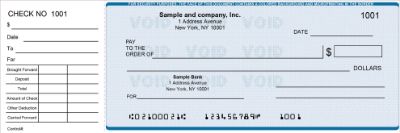
- Pre-printed computer check stock: Ordered from a manufacturer with your business name, address, ABA routing number, and account number pre-printed. The format must match your software's print template. QuickBooks uses check-on-top (voucher) format by default.
- Your ABA routing number and account number: Required to order the pre-printed check stock. These are found at the bottom of any existing check from your bank. For how to read your routing and account number from a check, see our guide to creating business checks for businesses.
Once these four items are in place, generating computer checks is exactly as easy as the original content describes: enter the payment, hit print, sign. For the full range of QuickBooks-compatible computer check formats, see QuickBooks checks at Checkomatic. For guidance on what to look for when ordering, see what is the best place to order checks online.
Accepted by the World's Leading Banks
Every computer check from Checkomatic meets and exceeds ABA (American Bankers Association) specifications. The MICR line is pre-printed in certified magnetic iron oxide toner and verified against the Federal Reserve E-Payments Routing Directory before production begins. Computer checks generated from Checkomatic pre-printed stock clear through any US bank's reader-sorter system without rejection. ABA compliance is guaranteed on every order regardless of format or quantity. Browse the full range of business checks at Checkomatic. See the benefits of using QuickBooks checks for a complete overview of why computer check stock saves businesses money and time.
What Customers Say About Checkomatic Computer Checks
All reviews below are published on checkomatic.com and reproduced verbatim. Source: checkomatic.com/quickbooks-starter-pack-product, 4.5 stars from 166 verified reviews.
"First time ordering and I am super impressed with the quality of the checks. No issues with delivery. I will be ordering again!"
TClinton | ★★★★★ 5/5 | April 9, 2025 | Source: checkomatic.com/quickbooks-starter-pack-product
"Been with them for 15 years. Always reliable, always good quality, good service. What more can you ask for?"
ATV Inc. | ★★★★★ 5/5 | April 5, 2024 | Source: checkomatic.com/quickbooks-starter-pack-product
"We use CheckoMatic for all of our check needs! They have great prices and we receive our products in a timely manner!"
CG's Tax Service | ★★★★★ 5/5 | September 18, 2024 | Source: checkomatic.com/quickbooks-starter-pack-product
"I got 500 checks for less than half of what the bank wanted for 200!"
VVA Voucher Checks (Vietnam Veterans of America) | ★★★★★ 5/5 | July 6, 2024 | Source: checkomatic.com/quickbooks-starter-pack-product
"ASJ Wilson Construction has been a client of checkomatic for some years now and they've never disappointed this company. Thank you checkomatic for all that you do."
ASJ Wilson Construction | ★★★★★ 5/5 | June 6, 2024 | Source: checkomatic.com/quickbooks-starter-pack-product
"Affordable and efficient. My go-to business check printer."
Doe | ★★★★★ 5/5 | January 24, 2025 | Source: checkomatic.com/quickbooks-starter-pack-product
Why Choose Checkomatic for Computer Checks
In-House Manufacturing Since 1997
All computer check stock is manufactured at Checkomatic's own facility in Monroe, NY. No third-party print vendors. Direct manufacturing means consistent quality, 3 to 5 business day standard production, and competitive pricing without bank markup.
All Four Computer Check Formats Available
Check on top (voucher), check in middle, check on bottom, and 3-on-a-page formats are all available. Every format is pre-calibrated to match the print templates of QuickBooks, Sage, MYOB, Xero, and over 500 other accounting platforms.
ABA-Compliant MICR Pre-Verified
Every routing number is verified against the Federal Reserve E-Payments Routing Directory before production begins. Computer checks generated from Checkomatic stock clear at any US bank without rejection.
Free Logo Printing on Every Order
Black-and-white logo printing is included at no extra charge on every computer check order regardless of quantity. Your business name and logo appear on every check you generate, which adds professional consistency to every payment you make.
50 to 70 Percent Below Bank Pricing
Direct in-house manufacturing eliminates the bank's retail markup. Computer checks generated from Checkomatic stock cost 50 to 70 percent less per check than equivalent stock ordered through your bank. See the full range at computer checks for business.





