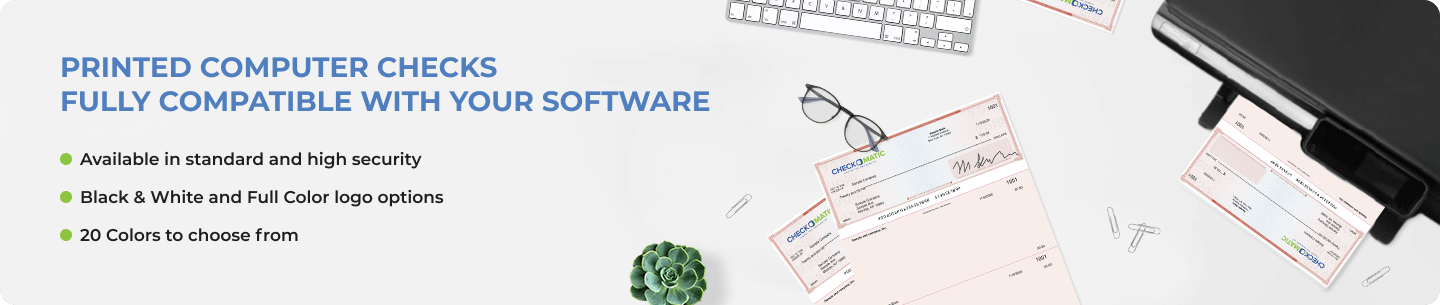
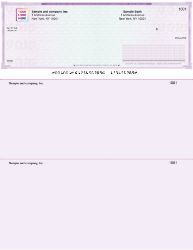
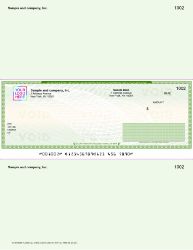
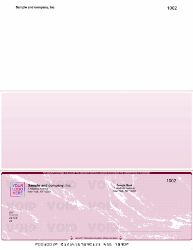
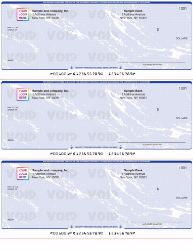
Enhanced Security and Customization: Our computer checks come with robust security features like heat-sensitive ink, coin-reactive ink, and invisible fluorescent fibers, ensuring the utmost security in your transactions. You can choose from a variety of styles and 20 different colors to suit your brand's needs.
Versatile Formats for Every Requirement: Whether you require the check on top, in the middle, on the bottom, three-on-a-page, or wallet/personal computer checks, we've got you covered. Our checks are designed to be durable, meeting the standards of the American Bankers Association, and are suitable for all readily available laser and inkjet printers.
Custom Logo Printing and Fast Delivery: Customize your checks with your company's logo in black & white or full color, enhancing your professional image. Provide us with your company details and bank information, and we can have your checks ready for delivery as soon as the next day. Don't miss out on our bulk order discounts for even greater savings.
Choose Checkomatic for reliable, high-quality computer checks that align with your business's operational and security needs.
What computer checks actually are
Computer checks are blank check sheets formatted to print from accounting software using a standard laser or inkjet printer. They replace handwritten checks for any business that wants speed, fewer errors, and a digital paper trail. The check itself is the same financial instrument your bank has always accepted. The difference is how it gets filled in.
Search results for 'computer checks' often pull up articles about checking your computer's specs or temperature. Those are unrelated. In accounting and banking, computer checks (also called printed checks or laser checks) refer to the blank stationery you load into a printer to issue payments. Sometimes called check stock, especially in payroll contexts.
Which accounting software works with Checkomatic computer checks
The short answer is most of them. Checkomatic computer checks are formatted to work with QuickBooks (Online, Desktop, Self-Employed), Quicken, Sage 50, Sage Intacct, Xero, MYOB, Microsoft Dynamics GP, NetSuite, FreshBooks, Peachtree, ACCPAC, Great Plains, MAS 90, Deltek, Yardi, and Microsoft Money.
If you're running niche or industry-specific software (Peachtree property management, hcfa Checkwriter, Procare, Ready to Run Accounting, Solomon, ProLaw, and several dozen others), Checkomatic can custom-format the checks at no additional cost. You give them the software name and version when you order. The team adjusts the print zones to match what the software outputs.
This matters because misaligned checks are the single biggest pain point with cheap online check vendors. A check that prints 2mm off on the date line still works at the bank, but the void column won't line up with the perforations and you'll waste sheets every time you print.
How to print computer checks correctly the first time
Three things cause first-time alignment issues: paper orientation, printer driver scaling, and check format mismatch in the software. Fix them in this order.
Paper orientation is the easy one. Your accounting software expects portrait, top-edge feed, with the check facing up or down depending on your printer's paper path. Print one test page on plain paper first and hold it up to a check sheet to confirm.
Driver scaling is sneaky. By default, some printer drivers are set to 'fit to page,' which shrinks the print area and pushes everything off-mark. Turn this off. The software output is already sized for letter paper. Any scaling makes it wrong.
Format mismatch is the most common one. If you ordered check-on-top format but your software is set to print check-on-bottom, every line will be off by two-thirds of a page. Check the print preferences inside QuickBooks (or whatever you use) and match the format you ordered.
When to choose computer checks over manual or pre-printed bank checks
Manual checks make sense when you write fewer than 10 checks a month and want the simplest possible setup. No printer needed, no software config, no alignment headaches. The trade-off is time and error rate. Manual entry mistakes are the leading cause of bank reconciliation problems for small businesses.
Pre-printed bank checks (the ones your bank ships you with names and addresses already filled in) are middle-ground. Faster than manual, but you're paying bank-level prices, which run 3-5x higher than ordering computer checks online. Banks make money on check sales the same way they make money on overdraft fees. Quietly.
Computer checks win when you cut more than 20 checks a month, run payroll, or want everything reconciled inside accounting software automatically. The combined savings on per-check cost plus the time saved on bookkeeping usually pay for themselves in the first reorder.
Why Checkomatic is the trusted source for cheap computer checks online
Three things separate Checkomatic from the big-box and bank options. Pricing is set against bulk wholesale, not retail markup, so a box of 250 voucher checks runs around 70% less than the equivalent box from Intuit or your bank. Free black-and-white logo printing is included on every order. And the entire catalog meets American Bankers Association standards, so there's no risk that 'cheap' means 'rejected at the teller.'
Checkomatic has been printing computer checks since 1997. The company is BBB accredited, McAfee verified, and trusted by businesses across all 50 states. Reviews on the product pages run consistently 4.5-5.0 stars across thousands of orders, and the customer service team handles software-specific formatting questions directly, not through a chatbot.
Frequently asked questions about computer checks
Can I print computer checks on a regular inkjet or laser printer?
Yes. Checkomatic computer checks work on any standard inkjet or laser printer. Magnetic ink is only required if you're printing the MICR routing line yourself, which is rare.
How are computer checks different from laser checks?
They're the same thing. 'Laser checks' refers to the printer type. 'Computer checks' refers to the source. Both describe blank check stock printed via accounting software.
Are computer printed checks safe?
Yes. Checkomatic computer checks include heat-sensitive ink, coin-reactive ink, chemically sensitive paper, and microprinting. They meet ABA security specs and are accepted by every major US bank.
Can I order computer checks with my company logo printed in color?
Yes. Black-and-white logo printing is free. Color logos are available for a small additional fee, and you can include extra signature lines at no charge.
What's the minimum order for computer checks?
Fifty checks is the minimum. Bulk discounts kick in at 250 and scale up through 10,000 per order. Most businesses order between 250 and 1,000 at a time.
Do computer checks come with stubs?
Voucher checks (check on top, middle, or bottom) come with two stubs per sheet. Three-on-a-page checks have no stubs and are designed for businesses that track details elsewhere.
Will Checkomatic format checks for software that isn't on the standard list?
Yes. Custom formatting is free. Send the software name and version with your order, and the team adjusts the print template to match.
Computer Check on Top
Does your company have to issue a multitude of checks every day? Wouldn’t it be great if you could find a reliable and affordable supplier of laser computer checks to reduce banking time and effort? That’s where Checkomatic steps into the picture to make your life easier.
We offer several different background texture and color options on all our laser computer checks. Order your stock of laser computer checks in varying quantities ranging from 50 to 10,000. Plus, you can avail of generous percentage-based discounts (70% or more) on bulk orders.
That’s not all!
At Checkomatic, color customization options include three textures (diamond, marble, or prismatic) along with seven unique background color choices (green, blue, burgundy, brown, gold, green-blue, and blue-red). Plus, advanced security features are printed into each check including Check-21 compliant protocols, DocuGuard anti-fraud enhancements, and more.
Our laser computer checks on top come with the check printed at the top of the page and two separate vouchers beneath the check. These vouchers are suitable for recording payroll details, account balance details, invoicing summaries, and other relevant information. Our computer checks on top are best suited for use with QuickBooks, Quicken, Intuit 7.0, Microsoft Money, Quick Check, MYOB Accounting, and other industry-leading accounting software.
We also take special care to ensure that our checks comply with the latest American Bankers Association regulations. With Checkomatic, ordering laser computer checks online has never been easier. Just select your preferred quantity and click the “Next” button. Enter your personal/company details and banking information in the appropriate input fields, choose your preferred font, and upload your logo.
And that’s it! If you’re running out of time, don’t forget to leverage the rush delivery options to get your checks delivered as soon as tomorrow.
Computer Check in Middle
So, you’ve found the perfect laser computer checks for your business. They look awesome and boast a wide array of sophisticated security features. It’s only when you start using these checks that you realize you need a separate notepad to record every transaction. Save yourself from this trouble by ordering laser checks in middle format from Checkomatic.
Our selection of laser computer checks (middle format) are printed with the check in the middle of the sheet. Each sheet includes two perforated stubs on either end of the check. This format is suitable for businesses that require extra space at the bottom to record and organize transaction details. However, to print on the blank check products, you’ll need special check printing software.
At Checkomatic, we take the utmost care to ensure that our laser computer checks comply with the latest standards of the American Bankers Association. Plus, we only use the most premium quality paper, so that our checks can withstand regular office use. Our checks are compatible with all industry-standard accounting software. We can even custom format the checks for your software.
That’s not all!
Our blank check stock middle check inventory is available in three different background styles, namely: diamond, prismatic, and marble. We also boast several other customization options (e.g. custom logo, custom color choices, security upgrades, etc.). Background color choices include blue, brown, gold, burgundy, and green.
In addition to numerous customization options, we provide complimentary black and white logo printing on all blank check stock middle check orders. Color logo printing is available for a small additional fee. Plus, we offer two expedited shipping upgrades on all orders for laser computer checks. Our fastest shipping option (“Rush B”) includes overnight delivery of your first 50 checks. You can also avail of huge discounts on bulk orders.
Computer Checks on Bottom
Does your company use business checks for making payments to vendors, creditors, employees, and others? Are you looking for customizable pre-printed computer checks that’ll work with your accounting software? Wouldn’t it be even better if these checks came with handy payment stubs to record transaction and payee details? If your answer to any of the above questions is a resounding “yes”, you’ve come to the right place.
At Checkomatic, we’ve designed an impressive assortment of affordable and versatile computer checks for all your professional and personal needs. Nevertheless, our computer checks on bottom are one of our customers’ all-time favorites. This isn’t surprising considering that these pre-printed computer checks make financial recordkeeping a cakewalk.
The checks are printed on the bottom of the sheet with two payment stubs on top. While you can keep one stub for your official records, the other can be handed over to the payee. This makes our pre-printed computer checks on bottom ideal for accounts payable and payroll.
Plus, they come with a ton of advanced security enhancements such as coin-reactive ink, chemically sensitive paper, and more. We also take the utmost care to ensure that our checks comply with the latest guidelines of the American Bankers Association. These checks are designed to work on both laser and inkjet printers and are compatible with all industry-standard accounting software such as QuickBooks, Quicken, Microsoft Money, etc.
That’s not all!
We carefully source our raw materials to ensure that all our checks are of premium quality and can withstand rigorous office use. And we offer a ton of customization options including numerous background style and color choices. Plus, you can get your black and white company logo printed on these checks for free. You can also avail of color printing options for a nominal cost. Don’t forget to leverage our generous discounts by ordering your custom computer checks with logo in bulk.
Computer Checks - 3 on a Page
Computer checks are one of the most versatile and essential checking supplies every company should have. Whether you’re managing payroll or making payments to vendors, these checks come in handy. And if you don’t need payment stubs to record transaction details, Checkomatic’s three-on-a-page computer checks are the right fit for your organization.
The most obvious benefit of using 3-on-a-page checks is that you save plenty of money and resources. However, when you buy business checks in the 3-on-a-page format from Checkomatic, you also get a wide array of customization options. You can choose from three attractive background styles (diamond, marble, and prismatic) and 12 subtle colors including blue, burgundy, gold, and more.
Plus, you can get your company logo printed in black and white for free on your three-on-a-page computer checks. We can even add extra signature lines and print your bank account information on these checks.
That’s not all!
At Checkomatic, we take the utmost care to ensure that all computer checks in the 3-to-a-page format comply with the guidelines of the American Bankers Association. They’re also compatible with industry-standard accounting software such as QuickBooks, Quicken, etc. and work on both laser and inkjet printers.
Plus, our checks feature numerous advanced security enhancements including coin-reactive ink, invisible fluorescent fibers, and more. We can even custom format the three-on-a-page computer checks for your accounting software. And you can avail of awesome discounts on bulk orders.