


Why Business Check Type Matters
When running a business, it's best to have all the stationary for your company, including business checks, to display your company logo and/or header.
With so many different small businesses going today, it is quite popular for a company to write its own business checks and do all its own bookkeeping. When companies decide to file and complete its own payroll, software industries such as QuickBooks are a lifesaver when writing business checks. It can make the design and logo look professional and respective for all who see it.
The most common checks used for company payroll are computer checks that are printed right at the business. These types of business checks will have all the same information on them that professional printers would offer, including the background of your choice. The bonus of computer based business checks are that the information is stored on a computer, making sure it is always at your fingertips whenever you need to go over an expense. With computer based business checks, those who make out the payroll can print out the checks quickly and easily, especially if nothing changes for hours or pay from week to week.
For more detail, see what kind of checks to order for your business.
The computer-based software can make payroll more of a point and click application than a point and type process of filling out each check individually. Manual made business checks have been around since the dawn of recorded business in the United States. In current times though, it has become purely obsolete except in emergency cases. Some of these cases can involve payroll mistakes and out of office payments to vendors that may have been shorted on a payment.
Company to client payouts can't always be done in a hurry, which can be quickly accomplished by manual written business checks. Business checks done by computer on company grounds are really the best way to ensure safety for the business and the employees.
If a no-name individual is printing checks off-site, there is no way to contact them for updates or check changes at the last minute. Last minute changes for any business issue is always a pain, but it can be compounded by not being able to contact a direct employee and have them make the changes immediately. The vast majority of times, the mistake can go unnoticed until the employee finds that there has been a mistake, and the time to get it repaired can be upwards to a week. That can make the employee moral drop considerably.
If necessary, most check printing companies will be able to work with Quicken Checks or other software formats if both are going to be needed to run the business smoothly.
Manual business checks can be finished with a professional look as well, with your favored company logo and background. It can be made to include the company name, address, colors, and even include additional safety features.
For the full range of business check options at Checkomatic, browse business checks.
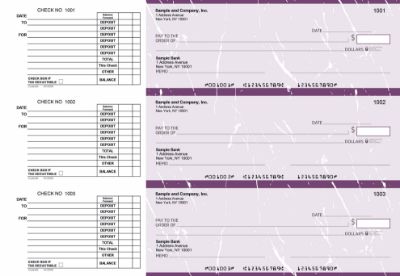
The Main Types of Business Checks
Every business check falls into one of two categories: computer checks and manual checks. Within computer checks, there are three format options. Understanding these distinctions helps you match the right check type to each payment situation your business faces.
- Computer checks , printed through accounting software on pre-printed check stock. Variable fields (payee, amount, date) are generated by the software. Best for regular, recurring payments at any volume.
- Manual checks , handwritten in a bound binder format with carbonless copy paper. Best for emergency payments, field payments, and low-volume situations without a printer available.
Both types include your business name, address, logo, ABA routing number, and account number pre-printed on the check stock and are accepted at all US banks. The difference is in how you complete each individual check , software or pen.
Computer Checks: Formats and Best Uses
Computer checks are the primary business check type for most companies today. The original content correctly identifies this as the best approach for payroll and regular business payments. Here is what each computer check format looks like and when each one is the right choice.
Voucher Checks (Check on Top)
One check occupies the top third of an 8.5 by 11 inch page. Two perforated stubs fill the bottom two-thirds. The stubs show payment detail: payee name, payment date, invoice number, amount, and memo. One stub goes to the payee. The second stays with the payer as a physical record.
Voucher checks are the best format for payroll because the stub provides employees with an itemized record of their pay. Many US states require employers to provide employees with wage detail at each pay period , a voucher check stub satisfies this requirement at the point of payment without a separate document. Voucher is the default QuickBooks payroll format.
Standard Checks (3-on-a-Page)
Three checks print on a single page with no stubs. All records are stored electronically in the accounting software rather than on a physical stub. Standard 3-on-a-page checks print three times faster than voucher checks for the same number of payments and use one-third of the paper.
This format is best for high-volume accounts payable where digital records in your accounting software replace physical stubs. Vendor payments, utility bills, and regular recurring expenses that do not require a paper stub at delivery are ideal candidates for 3-on-a-page format.
Wallet Checks (Personal Size)
Three wallet-sized checks per page, each the same physical dimensions as a personal bank check. Best for sole proprietors and owner-operators who prefer a compact, portable check format. Three per page like standard checks, but in personal check size.
For a detailed comparison of voucher and wallet formats including use cases and format dimensions, see voucher checks vs wallet checks. Browse all computer check formats at computer checks for business.
Manual Checks: When to Use Them
As the original content explains, manual checks have been around since the earliest days of US business. They are no longer the primary check type for most businesses, but they remain useful in specific situations the original content correctly identifies.
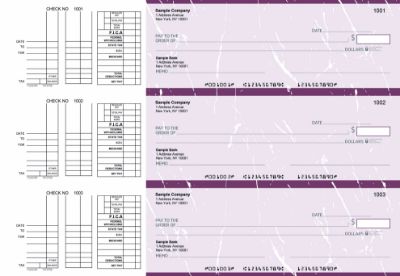
Emergency Payroll Corrections
When a payroll run contains an error and an employee needs immediate correction, waiting for a reprinted computer check run is not always practical. A manual check written on the spot resolves the issue immediately without reprinting or rerunning software.
Out-of-Office Vendor Payments
Field supervisors, project managers, and service businesses that make vendor or contractor payments away from the office use manual checks because they do not require a printer, a computer, or an internet connection. The binder fits in a bag and can be used anywhere.
Low-Volume Operations Without Accounting Software
Very small businesses, sole proprietors, and startups that write fewer than five checks per month may find manual checks simpler than setting up and maintaining accounting software for check printing. The carbon copy creates an automatic record with every payment.
Backup When Equipment Fails
A printer failure, a power outage, or a software problem on payroll day can halt check production. Businesses that keep a supply of manual checks on hand always have a fallback for urgent payments while equipment issues are resolved.
Browse all manual check formats and binder styles at manual checks at Checkomatic.
The right business check format depends on three things: how you use the check, what volume you process, and what software you use. Here is the simple decision path.
Use Voucher Checks If:
- You run payroll for employees who receive paper checks
- You send vendor payments with remittance detail showing which invoices are covered
- Your state requires itemized pay stub information with each paycheck
- You use QuickBooks for payroll (voucher is the default format)
Use Standard 3-on-a-Page If:
- You process high-volume accounts payable without needing paper stubs
- All payment records live in your accounting software
- You want to minimize paper use and printing time per batch
Use Wallet Checks If:
- You are a sole proprietor or owner-operator writing checks occasionally
- You prefer a compact, portable check that fits in a standard checkbook
Use Manual Checks If:
- You need checks for field use or emergency payments away from the office
- You write fewer than 5 checks per month and do not use accounting software
- You want a backup supply for printer or software failures
For QuickBooks-compatible checks in all three computer formats, see QuickBooks checks at Checkomatic. For help selecting the best source for your check order, see what is the best place to order checks online.
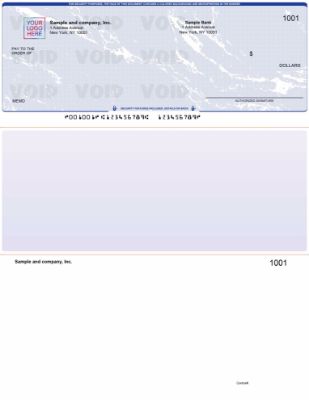
Security Features Every Business Check Should Have
As the original content notes, both computer and manual business checks can include security features and a professional logo. Here is what to look for when ordering any type of business check.
- Company logo and name: Identifies the check as coming from your business. Printed on all Checkomatic business checks at no extra charge.
- Chemically sensitive paper: Reacts visibly when solvents used in check washing are applied. Leaves a permanent stain that identifies tampering.
- Microprinting: Text printed at under one point size along the signature line that degrades to a blur on photocopies.
- Watermark: Embedded during paper manufacturing. Appears when the check is held to light. Cannot be replicated by surface printing.
- UV fluorescent fibers: Embedded in the paper. Glow under ultraviolet light used by bank authentication equipment.
- MICR encoding: Routing and account number printed in certified magnetic toner for automated bank processing.
Checkomatic includes all six security features at the base price on every business check order, regardless of format or quantity. For why these features matter for both computer and manual checks, see the benefits of using QuickBooks checks.
Accepted by the World's Leading Banks
Every business check from Checkomatic, whether computer check or manual check, meets and exceeds ABA (American Bankers Association) specifications. The MICR line is pre-printed in certified magnetic toner and verified against the Federal Reserve E-Payments Routing Directory before production. All check formats , voucher, standard 3-on-a-page, wallet, and manual , clear at any US bank without rejection. For a complete overview of everything Checkomatic offers for business check printing, browse business checks.
What Customers Say About Checkomatic Business Checks
All reviews below are published on checkomatic.com and reproduced verbatim. Source: checkomatic.com/quickbooks-starter-pack-product, 4.5 stars from 166 verified reviews.
"First time ordering and I am super impressed with the quality of the checks. No issues with delivery. I will be ordering again!"
TClinton | ★★★★★ 5/5 | April 9, 2025 | Source: checkomatic.com/quickbooks-starter-pack-product
"Been with them for 15 years. Always reliable, always good quality, good service. What more can you ask for?"
ATV Inc. | ★★★★★ 5/5 | April 5, 2024 | Source: checkomatic.com/quickbooks-starter-pack-product
"We use CheckoMatic for all of our check needs! They have great prices and we receive our products in a timely manner!"
CG's Tax Service | ★★★★★ 5/5 | September 18, 2024 | Source: checkomatic.com/quickbooks-starter-pack-product
"I got 500 checks for less than half of what the bank wanted for 200!"
VVA Voucher Checks (Vietnam Veterans of America) | ★★★★★ 5/5 | July 6, 2024 | Source: checkomatic.com/quickbooks-starter-pack-product
"ASJ Wilson Construction has been a client of checkomatic for some years now and they've never disappointed this company. Thank you checkomatic for all that you do."
ASJ Wilson Construction | ★★★★★ 5/5 | June 6, 2024 | Source: checkomatic.com/quickbooks-starter-pack-product
"Affordable and efficient. My go-to business check printer."
Doe | ★★★★★ 5/5 | January 24, 2025 | Source: checkomatic.com/quickbooks-starter-pack-product
Why Choose Checkomatic for All Types of Business Checks
Every Business Check Type in One Place
Computer checks in voucher, standard 3-on-a-page, and wallet formats. Manual checks in multiple binder sizes. QuickBooks-compatible formats for all accounting software platforms. All manufactured at Checkomatic's own facility in Monroe, NY since 1997.
Free Logo Printing on Every Order
As the original content correctly emphasizes, business checks should display your company logo. Checkomatic includes black-and-white logo printing at no extra charge on every business check order, regardless of format or quantity.
Six Security Features at the Base Price
Chemically sensitive paper, microprinting, watermark, UV fluorescent fibers, heat-sensitive ink, and MICR pre-encoding are standard on every order. No security upgrade fee. Same protection on computer checks and manual checks.
In-House Manufacturing Since 1997
All business checks are produced at Checkomatic's own facility. No third-party printers. Standard production ships in 3 to 5 business days. Rush options available. As the original content notes, ordering from a manufacturer means you have a direct contact for last-minute changes , not an anonymous off-site printer. Browse the complete range at business checks and computer checks for business.





