


Why HOA Management Has Unique Business Check Needs
A homeowners association, condo association, or community association is a legal entity with its own financial obligations, its own bank accounts, and its own fiduciary responsibilities to the homeowners it represents. HOA boards and professional property managers operate under state HOA statutes, community governing documents (CC&Rs and bylaws), and in many cases, annual audit requirements that govern how money is spent, documented, and disclosed.
Business checks for HOA management are not simply general-purpose checks with the community name pre-printed. They are financial instruments that must support the HOA's specific account structure, authorization requirements, and recordkeeping obligations. Most HOAs maintain at minimum two separate bank accounts: an operating account for day-to-day expenses and a reserve fund account for capital expenditure projects planned through a reserve study. Both accounts require their own dedicated check stock, their own check number ranges, and their own check registers.
Professional property management companies managing multiple HOA communities face an additional layer of complexity: they may maintain separate check accounts for each community they manage, each with its own pre-printed banking details, its own authorization requirements, and its own annual financial disclosure cycle.
Operating Account Checks for Day-to-Day HOA Expenses
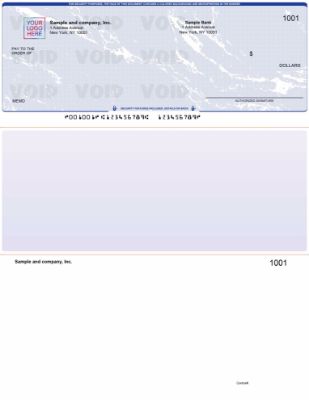
Check-on-top voucher checks from Checkomatic for HOA operating account vendor payments and day-to-day community expense AP.
The HOA operating account funds the community's day-to-day running costs: landscaping and groundskeeping contracts, cleaning and janitorial services, utility bills for common areas, property management fees, insurance premiums, pool maintenance, pest control, security services, and routine repair invoices. These payments come from the operating account on a regular, recurring cycle throughout the year.
Operating account checks for an HOA management company or self-managed board typically benefit from a voucher format that includes a stub documenting the vendor name, invoice number, payment date, and the property or cost center the expense applies to. For management companies using accounting software, the software fills in these details automatically at print time. For self-managed boards writing checks by hand, a pre-formatted AP stub makes the recordkeeping process simple and consistent.
For computer voucher checks compatible with most HOA management software platforms, see check-on-top business checks. For Yardi-specific operating account checks, see Yardi check on top.
Reserve Fund Account Checks for Capital Expenditures
The reserve fund is the HOA's long-term capital account. It is funded by a portion of each homeowner's monthly assessment, accumulated over years according to a reserve study that projects when major community components will need replacement. Reserve fund disbursements cover roof replacements, elevator overhauls, pool resurfacing, parking lot repaving, exterior painting, and any other capital expenditure identified in the reserve study.
Reserve fund checks carry greater financial weight than operating checks. A single reserve fund disbursement for a roof replacement project may be $50,000 to $200,000 or more. Under most state HOA statutes and community governing documents, the reserve fund must be kept completely separate from the operating fund. Commingling the two accounts is a fiduciary violation regardless of whether any funds are actually misused.
Reserve fund checks should therefore have their own pre-printed banking details from the reserve bank account, their own check number range starting point, and their own check register. In most HOA financial management systems, reserve fund disbursements also require board authorization documented by a board meeting resolution or a signed disbursement request, in addition to the dual-signature check requirement covered below.
Dual-Signature Requirements for HOA Disbursements
Dual-signature authorization on disbursements is one of the most important financial controls an HOA can maintain. When two authorized signers must review and sign every check, no single board member, treasurer, or property manager can unilaterally authorize a payment without a second person's knowledge and approval. This prevents both intentional fraud and unintentional errors that can expose the HOA to financial liability.
When Dual Signature Is Required
Most HOA governing documents require dual signature on checks above a specified dollar threshold, typically $1,000 to $5,000, though some require it on all disbursements. Many state HOA statutes, particularly for condominiums, require dual authorization on reserve fund disbursements regardless of amount. Even where dual signature is not legally required, it is strongly recommended as a financial control for any HOA with reserve fund assets or operating budgets above a modest size.
Who Are the Authorized Signers
For a self-managed HOA, authorized signers are typically the board president and treasurer, or any two of three named board officers. For a professionally managed community, the management company may be one authorized signer with a board officer as the second. The specific authorized signers and any threshold amounts should be documented in the board's annual resolution or the management agreement, and the bank should have signature cards on file for every authorized signer.
Checkomatic includes a dual-signature line on any business check order at no additional cost. Specify the dual-signature requirement at checkout. See the full computer check range at computer checks and the manual check range at manual business checks.
Vendor and Contractor AP Checks for HOA Communities
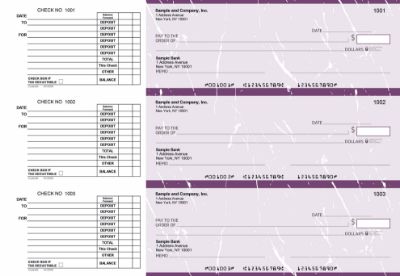
Manual AP checks from Checkomatic for HOA vendor and contractor payments with invoice stub detail for community expense recordkeeping.
The largest category of HOA check writing is vendor and contractor AP: every invoice from every vendor serving the community generates a check. Landscaping companies, pool service providers, elevator maintenance contractors, general maintenance firms, pest control services, snow removal contractors, and the management company itself all receive checks from the HOA operating account on regular payment cycles.
1099-NEC Obligations for HOA Vendor Payments
HOAs are not exempt from 1099-NEC reporting requirements. Any vendor that is an individual, sole proprietor, partnership, or LLC not taxed as a corporation and receives $600 or more from the HOA in a calendar year requires a 1099-NEC. This applies to landscapers, handymen, unlicensed contractors, and any service provider not operating through a corporation. The AP check register is the primary source document for calculating annual payments per vendor. Collecting a W-9 from every vendor before the first check is essential for year-end compliance.
Tracking Payments by Property or Cost Center
For management companies overseeing multiple communities, tracking which community each vendor payment applies to requires the check stub or memo line to carry the property or cost center reference. A check stub that clearly notes the community name, vendor invoice number, and payment period makes cost allocation simple and clear at month-end and supports the financial reporting provided to each HOA's board. For the full AP check range with stub documentation, see manual 3-on-page accounts payable checks.
CAM Reconciliation and Owner Distribution Checks
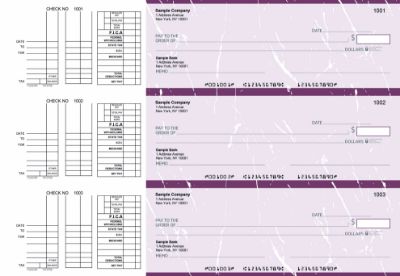
Multi-purpose manual checks from Checkomatic for HOA management companies handling mixed disbursements including CAM reconciliations and owner distributions.
Common Area Maintenance (CAM) reconciliation is the annual process where actual common area costs are compared against the estimated CAM charges collected from commercial tenants or homeowners during the year. If actual CAM costs were lower than estimated collections, the HOA or management company owes refund checks to the owners or tenants. If actual costs exceeded estimates, additional CAM charges are billed.
CAM refund checks are disbursed from the operating account with a stub or remittance document explaining the reconciliation calculation. These checks are sent to individual homeowners or tenants at year end, making clear stub documentation essential so recipients understand what the payment covers. For a multi-purpose check format that handles both regular vendor AP and occasional owner distribution payments, see multi-purpose manual business checks.
HOA Management Software Check Compatibility
Professional HOA management companies and property managers using accounting software need check stock formatted to match their software's print template. The format must be ordered correctly before printing, because the check stock's field positions must align with where the software outputs the payee name, dollar amount, date, and check number.
| HOA Software | Check Format | Checkomatic Link |
|---|---|---|
| Yardi Voyager and Yardi Breeze Premier | Yardi check on top (pre-formatted) | Yardi check on top |
| AppFolio Property Manager | Check on top (voucher) | Check-on-top checks |
| Buildium | Check on top (voucher) | Software compatible checks |
| QuickBooks (HOA self-managed) | Check on top (voucher) | Software compatible checks |
| No software (self-managed small HOA) | Manual 3-on-page AP or multi-purpose | Manual AP checks |
For the full Yardi property management check guide, see Yardi compatible checks: Checkomatic's complete guide. For all software formats, see accounting software compatible business checks.
Self-Managed HOA Check Workflows
Many small and mid-size HOAs manage their own finances without a professional property management company. The board treasurer or a designated board member handles check writing for vendor payments, utility bills, and reserve fund disbursements. For self-managed HOAs writing fewer than 20 checks per month, manual 3-on-page AP checks are often the most practical option.
What Self-Managed HOA Treasurers Need
- Separate check stock for the operating account and the reserve fund account, each pre-printed with the correct account details
- Non-overlapping check number ranges for each account so the check register stays clean
- Dual-signature lines on reserve fund checks per the HOA's governing documents
- AP stub fields to record vendor name, invoice number, and payment reference on every check
- Enough stock to cover 6 to 12 months of typical check volume without reordering mid-year
For low-volume self-managed HOAs that need both operating and occasional reserve fund checks without maintaining separate checkbooks, a multi-purpose manual check format with a flexible stub layout handles both payment types from a single order, provided the accounts are tracked separately in a check register. For the full recordkeeping guide, see checkbook management: how to balance and reconcile.
HOA Check Format Comparison
| Payment Type | HOA Type | Best Format | Checkomatic Link |
|---|---|---|---|
| Operating account vendor AP | Managed, high volume | Computer voucher on top | Check-on-top |
| Reserve fund disbursements | All HOA types | Computer or manual, dual signature | Computer checks |
| Yardi AP operating account | Yardi users | Yardi check on top | Yardi check on top |
| Self-managed vendor AP | Self-managed HOA | Manual 3-on-page AP | Manual AP checks |
| Mixed operating and reserve (small HOA) | Self-managed | Multi-purpose manual | Multi-purpose manual checks |
| CAM reconciliation and owner distributions | Managed communities | Multi-purpose or AP | Multi-purpose manual checks |
Why Operating and Reserve Check Sequences Must Stay Separate
Running operating account checks and reserve fund account checks from the same check number sequence creates three problems. First, it makes annual audit reconciliation slow and error-prone because every check in the register must be manually categorized as operating or reserve. Second, it creates a commingling appearance even if no funds are actually mixed, which can raise issues with the HOA's CPA during the annual review. Third, it complicates the financial disclosures that most state HOA statutes require HOA boards to provide to homeowners, because the operating and reserve fund ledgers must be presented separately.
The clean setup for HOA check management is:
- Operating account checks: Separate pre-printed check stock from the operating bank account. Check numbers starting at 1001 or a designated operating range.
- Reserve fund account checks: Separate pre-printed check stock from the reserve bank account. Check numbers starting at 5001 or a designated reserve range.
- Each account's check register maintained independently.
This separation means the annual audit pulls from two clean, separate registers. The operating ledger shows all vendor and operating expense payments. The reserve ledger shows only capital expenditure disbursements. No sorting, no manual categorization, no reconciliation confusion. For checkbook management and reconciliation guidance, see checkbook management: how to balance and reconcile.
Checks and HOA Annual Audit Documentation
Most state HOA statutes require homeowners associations above a certain budget threshold to conduct an annual financial review or audit performed by an independent CPA. The physical check stub is one of the primary source documents the auditor reviews to verify that disbursements were properly authorized, correctly categorized, and accurately recorded in the general ledger.
A check stub that clearly shows the payee, invoice number, amount, payment date, and account or cost center provides the auditor with the documentation they need without requiring a separate search through vendor files for every transaction. HOAs that write checks without stubs, or that maintain check records only in software without printing stubs, create more work for the auditor and increase the risk of audit findings.
Physical check stubs should be filed chronologically by account after each check is written. Operating account stubs and reserve fund account stubs should be filed separately to match the separate check registers.
Check Security for Reserve Fund Disbursements
Security features on every Checkomatic HOA business check, protecting reserve fund disbursements and vendor payments from check fraud and washing.
Reserve fund disbursements for capital projects are among the highest-value checks any HOA writes. A roof replacement check for $85,000 mailed to a roofing contractor is a significant fraud target. Check washing, where a criminal intercepts a mailed check, chemically removes the payee name and amount, and rewrites a new payee and amount, is the most common fraud method targeting high-value business checks.
Every Checkomatic business check includes six ABA-compliant security features as standard on every order at the base price:
- Chemical-reactive paper: Stains visibly when washing solvents are applied, revealing alteration before the bank processes the check.
- Microprint signature line: Tiny repeating text that blurs on any photocopy, flagging reproductions at the bank.
- Void pantograph: Background pattern that makes VOID appear clearly when the check is photocopied or scanned.
- Heat-sensitive ink: Disappears when pressed with a warm thumb, a standard bank teller authenticity test.
- Coin-reactive ink: Changes appearance when rubbed with a hard metal object.
- True watermark: Visible from both sides under light, absent from counterfeits.
For reserve fund disbursements and high-value AP payments, pairing check security features with positive pay through the HOA's bank provides the most complete fraud protection. Positive pay matches every presented check against the HOA's issued check list before processing it, stopping fraudulent checks even if they carry the correct account details. For the full positive pay guide, see what is positive pay and how does it work. For the complete security feature guide, see are business checks safe: security features that actually matter.
Check Envelopes for HOA Disbursements
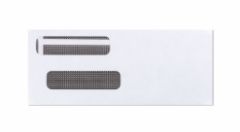
Check envelopes from Checkomatic for mailing HOA vendor payments, reserve fund disbursements, and owner distribution checks.
HOA management companies and self-managed boards that mail checks to vendors, contractors, and homeowners need properly sized check envelopes. A standard business check does not fold neatly into a standard letter envelope without risking damage to the MICR line at the bottom, which can cause bank processing issues.
Checkomatic check envelopes are sized specifically for standard business checks without folding. The security-tinted interior prevents the check amount and payee from being visible through the envelope, reducing the risk of check theft in transit. For high-value reserve fund disbursements mailed to contractors, a security-tinted envelope adds one more layer of protection alongside the check's built-in security features. See check envelopes.
How to Order Business Checks for Your HOA
What to Have Ready Before Ordering
- HOA legal name: The full registered name of the homeowners association, condominium association, or community association exactly as it appears on the bank account. For management companies ordering on behalf of a community, use the community's legal name, not the management company name, on check stock for that community's account.
- Bank ABA routing number: From the online banking portal for each account. Operating and reserve accounts will have different account numbers and may have different routing numbers depending on your bank setup.
- Account number: Specific to each checking account. One order per account.
- Starting check number: Non-overlapping ranges for operating (e.g., 1001) and reserve (e.g., 5001).
- Dual-signature preference: Specify at checkout if your governing documents require two authorized signatures. No extra charge.
- HOA logo: Black and white logo printing is free on every Checkomatic order. Upload during the ordering process.
- Quantity: Estimate 12 months of check volume for each account and order accordingly. Higher quantities reduce the per-check cost.
Browse all business check formats at business checks. Standard orders ship from Monroe, NY in 3 to 5 business days.
What Customers Say About Checkomatic
All reviews below are published on checkomatic.com and reproduced verbatim. Source: checkomatic.com/quickbooks-starter-pack-product and checkomatic.com/business-checks, 4.5 stars from 166 verified reviews.
"I have used CheckOMatic services for my company and all condo associations we manage. It is not only the competitive prices, but also the dedication I feel that you put in our businesses. It reinforces my confidence in you as I also have to respond to other. It is like a chainlink. I was surprise to find that you also provide stamps. Thanks for All You Do for us in a very efficient manner and Thanks also for a excellent well-written email to us. It is quite motivating indeed!! Thank you!"
Verified Customer | ★★★★★ 5/5 | Source: checkomatic.com/business-checks
"Been with them for 15 years. Always reliable, always good quality, good service. What more can you ask for?"
ATV Inc. | ★★★★★ 5/5 | April 5, 2024 | Source: checkomatic.com/quickbooks-starter-pack-product
"First time ordering and I am super impressed with the quality of the checks. No issues with delivery. I will be ordering again!"
TClinton | ★★★★★ 5/5 | April 9, 2025 | Source: checkomatic.com/quickbooks-starter-pack-product
"We use CheckoMatic for all of our check needs! They have great prices and we receive our products in a timely manner!"
CG's Tax Service | ★★★★★ 5/5 | September 18, 2024 | Source: checkomatic.com/quickbooks-starter-pack-product
"I got 500 checks for less than half of what the bank wanted for 200!"
VVA Voucher Checks (Vietnam Veterans of America) | ★★★★★ 5/5 | July 6, 2024 | Source: checkomatic.com/quickbooks-starter-pack-product
"Affordable and efficient. My go-to business check printer."
Doe | ★★★★★ 5/5 | January 24, 2025 | Source: checkomatic.com/quickbooks-starter-pack-product
Why Choose Checkomatic for HOA Business Checks
Trusted by HOA and Condo Association Managers
Checkomatic has served property management companies, HOA boards, and condo association managers since 1997. Our customer base includes community managers who order checks for multiple associations from a single account and self-managed boards ordering for the first time. Browse the full range at business checks.
Dual Signature at No Extra Charge
HOA governing documents and state statutes commonly require two authorized signatures on disbursements. Specify the dual-signature line at checkout on any Checkomatic order at no additional cost. See computer checks and manual business checks.
All Six Security Features Standard
Chemical-reactive paper, microprinting, void pantograph, heat-sensitive ink, coin-reactive ink, and true watermark on every check at the base price. No upgrade needed for reserve fund disbursements. See are business checks safe: security features that actually matter.
Yardi, AppFolio, and Buildium Compatible Formats
Pre-formatted check stock for the most common HOA management software platforms. Yardi-specific check on top available for Voyager and Breeze Premier. For all software formats, see accounting software compatible business checks.





