


Before You Write: What You Need Ready
Writing a business check correctly takes less than two minutes when you have the right information in front of you before you start. Gathering this before picking up the pen prevents errors that require voiding and rewriting.
- The payee's full legal name. For a vendor, this is their business name exactly as it appears on their invoice ; not an abbreviation, nickname, or contact person's name. "Smith Electrical Contractors LLC" not "Bob Smith." The name you write on the payee line must match the name on the payee's bank account for the check to clear without delays.
- The exact dollar amount. Pull the invoice and verify the total. Do not estimate. If there are multiple invoices in a single payment, add them before you start writing and confirm the total.
- The invoice or PO number. This goes in the memo field. Having it written on the invoice in front of you before you start prevents forgetting it and having to add it later.
- Your next check number. Check numbers run sequentially. The next check in your book or printer should follow the last check you wrote. Do not skip numbers and do not reuse numbers.
- Your check register or accounting software open. You record the check immediately after writing it, while all the details are in front of you.
How to Write a Business Check: Every Field Step by Step
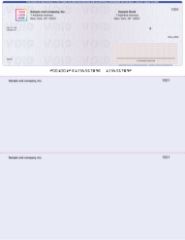
Voucher business check on top format ; all fields must be completed correctly before signing.
Step 1: Write the Date
Write today's date in the date field in the upper right area of the check. Use the standard US format: month/day/year. Write the full date clearly ; do not abbreviate the year to two digits or use shorthand that could be misread.
Do not post-date business checks by writing a future date. Post-dating does not legally prevent a bank from processing the check before that date in most US states. If you need to delay a payment, discuss payment terms with the vendor rather than relying on a future date on the check. For situations where you need to cancel a check before it clears, the correct tool is a stop payment order at your bank.
Step 2: Write the Payee Name
On the "Pay to the Order of" line, write the full legal name of the vendor, supplier, or individual being paid. For business vendors, use their registered business name exactly as it appears on their invoice. For employees, use their full legal name as it appears on their employment documents and tax forms.
Never leave the payee line blank. A blank payee line on a signed business check is functionally equivalent to a signed blank check. Anyone who receives it can write their own name in that field. If you need to issue a check before you have confirmed the exact payee name, hold the unsigned check until you can confirm the correct name. Never sign a check with a blank payee line.
Step 3: Enter the Dollar Amount in the Box
In the small rectangular box to the right of the payee line, write the numeric dollar amount. Start writing as close to the left edge of the box as possible ; this prevents anyone from inserting additional digits before your number. Write clearly in pen.
Include cents even when the amount is a round number. Write $500.00, not $500. The bank and your records benefit from the explicit decimal notation. If the amount has no cents, write 00/100 on the written line and confirm the box shows the decimal.
Step 4: Write the Dollar Amount in Words
On the written amount line below the payee field, write the dollar amount in words. For $1,247.50, write: "One thousand two hundred forty-seven and 50/100." Start at the far left of the line. After writing the amount, draw a horizontal line from the end of the words to the pre-printed "Dollars" at the right end of the line. This line fills the remaining space and prevents anyone from adding additional words to inflate the amount.
Under UCC Article 3, the written amount is the legally controlling amount if it conflicts with the numeric amount in the box. If you write $1,247.50 in the box but "one thousand two hundred and 50/100" in words, the check legally authorizes $1,200.50. Always verify both fields match before signing.
Step 5: Write the Invoice Number in the Memo Field
In the memo field in the lower left corner of the check, write the invoice number, purchase order reference, or payment description. For vendor payments: "Invoice 2847" or "INV-2847" or "PO-1094." For rent: "Rent March 2026." For payroll: "Pay period 08/01-08/15." This step is covered in full in the memo line section below.
Step 6: Sign the Check as the Authorized Signatory
Sign the check in the signature field in the lower right corner. The signature must match the specimen signature on file with your bank for the account. The bank's processing system and tellers use this signature to verify authenticity.
Sign only after all other fields are completely filled in. Never sign a blank check or a check with any unfilled fields. If your business account requires dual signatures, both authorized signatories must sign before the check leaves your office. This is covered in the dual signature section below.
How to Complete the Voucher Stubs on a Business Check
If you use voucher format business checks ; the most common format for business accounts payable and payroll ; each check comes with two detachable stubs below the check itself. The stubs must be completed at the same time you write the check, not after.
What Goes on Each Stub
Both stubs carry the same payment information. Fill in each stub with:
- Date: Same as the check date.
- Check number: The sequential number of this check.
- Payee name: Same vendor or employee name as on the check face.
- Invoice or reference number: The same invoice number you wrote in the memo field.
- Amount: Same dollar amount as the check.
- Balance forward (if applicable): Running account balance with the vendor, if you track partial payments against open invoices.
What Happens to Each Stub
The first stub goes to the payee. It functions as a remittance advice document ; it tells the vendor exactly which invoice your check covers without requiring a separate remittance letter or email. This is particularly important when paying partial amounts against a large invoice or consolidating multiple invoices into one check payment.
The second stub stays with you as a physical accounts payable record. File it with the corresponding invoice copy. The stub plus the invoice creates a complete paper trail for this payment transaction that exists independently of your accounting software.
For full guidance on voucher vs other business check formats, see voucher checks vs wallet checks: when to use each. To browse all voucher format business check options, see business checks at Checkomatic.
Authorized Signatory Rules for Business Checks
Self-inking endorsement stamps from Checkomatic for business check processing and deposit workflows.
This is the most important rule that separates business check writing from personal check writing. On a personal check, anyone who holds the check and knows the account can theoretically write a check. On a business account, only specifically designated individuals can legally authorize payments.
Who Is an Authorized Signatory
An authorized signatory is an individual whose name and signature specimen are on file with the bank as authorized to draw checks against a specific business checking account. When your business opens a checking account, the bank requires a signature card or account agreement that names these individuals. Only those named individuals ; by legal name as registered ; can sign checks on that account.
Why This Matters More Than People Think
If an employee who is not an authorized signatory writes and signs a business check, the bank may still honor it if the signature looks plausible. But the business retains liability for payments made by unauthorized signatories, and depending on the circumstances, the signing employee may face personal liability for the unauthorized transaction. This is why internal check authorization controls are not just procedural ; they are a legal protection for the business.
Best Practice for Authorized Signatories
Designate at least two authorized signatories so check writing can continue when the primary signatory is unavailable due to travel, illness, or other reasons. Common business setups include: the owner or CEO plus the controller or CFO for a small business; the CFO plus the AP manager for a medium-sized business. The bank updates the authorized signatory list through a formal process ; changes are not automatic when personnel changes occur. Keep the bank's signatory records current when key personnel change.
You may also find this useful: writing a check to yourself for deposit.
When a Business Check Requires Two Signatures
Some business checking accounts require two signatures on checks above a specified dollar threshold. This is a fraud prevention control that prevents a single individual from issuing large unauthorized payments unilaterally.
How Dual Signature Thresholds Work
At account opening, a business can request that the bank flag checks above a specified amount for dual signature verification. Common thresholds are $1,000, $5,000, or $10,000. Below the threshold, one authorized signatory can sign. Above it, two signatories must sign before the check is presented to the bank.
Setting the Right Threshold
Set the threshold low enough to catch significant vendor payments and high enough that routine operating expenses (office supplies, utilities, small vendor invoices) do not require two people to approve every check. For most small businesses, a $2,500 to $5,000 threshold balances control with operational efficiency.
What Happens Without the Second Signature
A check presented to the bank without the required second signature may be honored anyway depending on the bank's internal processes. Some banks verify dual signature requirements on every check. Others spot-check. The fact that the bank might honor the check does not eliminate the business's internal control violation. If the payment later turns out to be unauthorized or fraudulent, the absence of the second signature weakens the business's legal position in any recovery action.
How to Use the Memo Line for Accounts Payable Tracking
The memo line on a business check is one of the most underused fields in small business accounting. It takes five seconds to fill in and saves hours of AP research later.
What to Write in the Memo Field
- Single invoice payment: "Invoice 4821" or "INV-4821"
- Multiple invoices in one check: "INV-4821, 4822, 4823" or "Invoices per attached remittance"
- Partial payment against an invoice: "INV-4821 partial" or "INV-4821 $500 of $1,200"
- Rent or recurring payment: "Rent March 2026" or "Monthly retainer March 2026"
- Payroll check: "Pay period 08/01-08/15/2026"
- Utility or vendor account number: "Account 88471-223"
Why Invoice Numbers in the Memo Field Matter
When a vendor calls three months later claiming they never received payment for Invoice 4821, you can pull your check register, search for "INV-4821" in the memo column, and find the check number, date, and amount in under 60 seconds. Without the memo notation, tracing that payment requires cross-referencing dates, amounts, and vendor names manually ; a process that can take 20 to 30 minutes per disputed payment. For businesses that cut dozens of checks per month, the memo field is a free accounts payable efficiency tool on every check.
Memo Field Limitations
The memo field does not appear on your bank statement, does not affect check processing, and does not communicate directly to the payee's bank. It is a record-keeping tool for your books and a communication tool to the payee via the stub. If the payee needs specific information to process your payment, include it in the memo AND on the stub that goes to them.
How to Record a Business Check in Your Register
Every business check must be recorded in two places: your physical check register (or check stub) and your accounting software. Record both immediately after writing the check, while the details are in front of you.
In Your Check Register
Enter the check number, date, payee name, memo description, and dollar amount in the Payment column. Update the running balance. Your register balance decreases by the check amount the moment you write the check, not when it clears the bank. This is how you maintain an accurate available balance that accounts for checks you have written but that have not yet been presented for payment. For the complete check register guide, see check register: how to set up and use a checkbook ledger.
In QuickBooks or Accounting Software
Record the check as a check transaction in your accounts payable or checking account register. Apply the payment to the specific open invoice for that vendor. This closes the invoice in your AP ledger and matches the payment to the obligation it covers. If you use QuickBooks, the software generates a check record that can be printed, searched, and reconciled during month-end. The physical check stub and the software record should match exactly in amount, date, and payee name.
Immediate vs Delayed Recording
Always record immediately ; not at the end of the day, not at the end of the week, not during month-end reconciliation. A check you write and forget to record creates a phantom available balance in your account. If you write more checks against that phantom balance, you risk overdrafts. Even one check recorded late can cascade into multiple overdrafts if several checks clear before you update the balance.
Manual vs Computer-Printed Business Checks
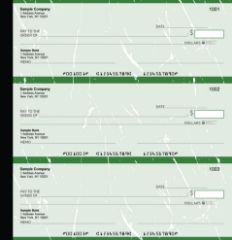
Manual executive deskbook business checks from Checkomatic ; carbonless duplicates create an instant payment record as you write.
The steps in this guide apply to both manual handwritten checks and computer-printed checks. The difference is who fills in the variable fields.
| Factor | Manual Handwritten Checks | Computer-Printed Checks |
|---|---|---|
| Who fills fields | Authorized signatory by hand | Accounting software prints all fields |
| Record keeping | Carbonless duplicate creates instant copy | Software records automatically at print |
| Best volume | Under 20 checks per month | 20 or more checks per month |
| Software required | No | Yes ; QuickBooks, Sage, etc. |
| Error risk | Higher ; handwriting errors possible | Lower ; software fills fields from records |
| Signatory still required? | Yes ; sign by hand | Yes ; sign by hand after printing |
For manual checks in binder or book format, see manual checks at Checkomatic. For computer-printed formats compatible with QuickBooks and other software, see computer checks for business.
Common Business Check Writing Mistakes
Mistake 1: Writing a Personal Name Instead of the Business Entity Name
A check drawn on "Smith Electrical LLC" signed by "John Smith" but written to "Bob Jones" instead of "Jones Plumbing Supply Inc." may create a tax and AP documentation problem. Always write the legal business name of the payee when paying a business entity. For a vendor that is a sole proprietor doing business as a company, confirm whether to use their personal name or DBA name before writing the check.
Mistake 2: Leaving the Memo Field Blank
Every business check payment has an underlying invoice, contract, or obligation it covers. Leaving the memo field blank makes that connection invisible on the physical check. Six months later, when a vendor disputes payment of Invoice 4821, the blank memo check provides no immediate confirmation of what it was for. Five seconds at the time of writing saves twenty minutes of research later.
Mistake 3: Not Completing the Voucher Stubs Before Detaching
Tearing the check away from the stubs before completing them defeats the purpose of voucher format. The stub is the physical payment documentation. A blank or partially completed stub is not a useful AP record. Complete both stubs fully before signing and detaching the check.
Mistake 4: Not Recording the Check Immediately
Writing a check and intending to record it later creates a phantom balance in your checking account. If you forget to record it and write additional checks against the unrecorded balance, you risk overdrafts when the unrecorded check clears. Record every check in your check register the moment you write it.
Mistake 5: Discarding a Voided Check Instead of Marking It
When you make an error on a check and need to start over, never simply discard the check. Write VOID in large permanent marker across the front of the check, record it as VOID in your check register with the check number noted, and retain the voided check for your records. A missing check number in your sequence triggers questions during audits and bank reconciliation. For the complete guide on voiding, see how to void a check: step-by-step guide for business.
Mistake 6: Using the Wrong Business Name on Check Stock
If your check stock prints the wrong business name, a name that has changed since the check stock was ordered, or a DBA name that does not match the bank account registration, every check you write creates an IRS documentation mismatch and may face payee deposit delays. Order new check stock whenever your legal business name changes. For all business check formats with correct entity name printing, see business checks at Checkomatic.
What Customers Say About Checkomatic
All reviews below are published on checkomatic.com and reproduced verbatim. Source: checkomatic.com/quickbooks-starter-pack-product, 4.5 stars from 166 verified reviews.
"Been with them for 15 years. Always reliable, always good quality, good service. What more can you ask for?"
ATV Inc. | ★★★★★ 5/5 | April 5, 2024 | Source: checkomatic.com/quickbooks-starter-pack-product
"First time ordering and I am super impressed with the quality of the checks. No issues with delivery. I will be ordering again!"
TClinton | ★★★★★ 5/5 | April 9, 2025 | Source: checkomatic.com/quickbooks-starter-pack-product
"We use CheckoMatic for all of our check needs! They have great prices and we receive our products in a timely manner!"
CG's Tax Service | ★★★★★ 5/5 | September 18, 2024 | Source: checkomatic.com/quickbooks-starter-pack-product
"I got 500 checks for less than half of what the bank wanted for 200!"
VVA Voucher Checks (Vietnam Veterans of America) | ★★★★★ 5/5 | July 6, 2024 | Source: checkomatic.com/quickbooks-starter-pack-product
"ASJ Wilson Construction has been a client of checkomatic for some years now and they've never disappointed this company. Thank you checkomatic for all that you do."
ASJ Wilson Construction | ★★★★★ 5/5 | June 6, 2024 | Source: checkomatic.com/quickbooks-starter-pack-product
"Affordable and efficient. My go-to business check printer."
Doe | ★★★★★ 5/5 | January 24, 2025 | Source: checkomatic.com/quickbooks-starter-pack-product
Why Choose Checkomatic for Business Check Stock
All Business Check Formats in One Place
Voucher (check on top), check in middle, check on bottom, 3-on-a-page, manual handwritten, payroll, and accounts payable formats. Every format manufactured at Checkomatic's facility in Monroe, NY since 1997. ABA routing number verified against the Federal Reserve E-Payments Routing Directory before every production run. Browse all formats at business checks and computer checks for business.
Manual Checks With Carbonless Duplicates for Handwritten AP
If you write checks by hand, Checkomatic's manual business checks include carbonless duplicate pages that create an instant copy of every check you write. The copy stays in the binder as your AP record. No separate register entry needed for the basic payment detail ; the carbon provides it automatically. Browse manual formats at manual checks.
Six Security Features Standard on Every Check
Chemically sensitive paper, microprinting, void pantograph, UV fluorescent fibers, heat-sensitive ink, and genuine watermark on every check at the base price. No security tier upgrade required. The security features protect every business check you write from the most common forms of business check fraud.
Pre-Printed Deposit Slips to Complete the Payment Cycle
When a vendor deposits your business check, they may need to fill out a deposit slip. For your own deposits of received checks, pre-printed deposit slips with your account details pre-printed save time at the teller. For business deposit slips matched to your account, see business deposit slips.





