


Why Laser Check Printing Changed Home Business
Laser Checks Technology continues to advance in great leaps and bounds every second of every day.
With an ever-growing influx of new products on the market, it is extremely difficult to keep up with all the possibilities. Technology has changed the business world in such dramatic ways that whole new job descriptions have to be written around new tech with new skills training necessary in order for employers and employees alike to become tech savvy. With the advent of the HP LaserJet, the old business paradigm has shifted. New LaserJet technology has made it possible to print laser checks from any home computer.
The creation of checks for your home business is a very important process. Your checks will reflect your business approach and acumen to the business world at large.
Like a business card, the design of your checks is a reflection of who you are. You want this reflection to inspire feelings of respect and confidence in you as a businessperson and in your company itself. This technology has opened new doors for home businesses everywhere. It has also created a new market for laser check design and sale. There are endless websites already up and running with the concept.
You can pick a pre-made design for your laser checks, or you can design your own. You input the information you want included in your laser checks, and pick a background design. The prices for these checks vary based on the company producing them and the intricacy of your design and the amount of data you want included. There are also shipping costs that vary depending on the volume of checks ordered and how quickly you need them delivered.
You may also find this useful: what kind of checks to order for your business.
It is possible to print your own laser checks if you have an HP LaserJet printer. In order to accomplish this from home, you need to buy the following: MICR/E13-B Fonts, truetype signature Fonts, and Check amount fonts. These items are necessary to create a legal digital signature on your checks. You also need to purchase a blank check template and blank check paper.
All of these items are sold on various laser check websites. It is possible to print laser checks online, which eliminates the hassle of having to go to the bank. You can find cheap ready-made templates and add in your company name, account information, your address, your bank routing and checking numbers. You can also personalize them by adding your company logo or a picture.
It is important to check with your bank before you choose an online check company to ensure your bank accepts checks from that company.
If you do not want to go through the process of creating and printing your own laser checks from home, there are many online businesses willing to do it for you, for a fee. They offer a wide range of templates and printing options, as well as a wide range of shipping options. It is important to ensure that the website you choose uses encryption to keep your sensitive bank account and personal information safe.
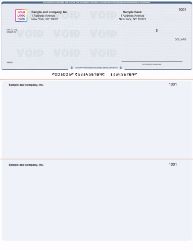
Two Ways to Print Laser Checks From Your Computer
The original content describes both approaches to printing laser checks from home. Here is a clear side-by-side view of what each method involves and which one suits most home business owners.
Most home business owners use Method 2. It is faster to set up, requires no font installation or MICR toner, and produces professional results on the first print run.
Method 1: Print Laser Checks Entirely From Your Computer
As the original content explains, this method requires purchasing MICR/E13-B fonts, TrueType signature fonts, and check amount fonts. These fonts allow your printer to produce the magnetic ink character recognition line that banks use to process checks automatically.
What MICR/E13-B Fonts Are
E13-B is the font standard used for the MICR line at the bottom of every check in the United States. This line contains your routing number, account number, and check number. When you print checks entirely from your computer using blank check paper, you are responsible for printing this MICR line. The E13-B font ensures your printer produces characters that bank reader-sorter machines can read magnetically.
What Else You Need for Method 1
- MICR toner cartridge: Standard ink does not have the magnetic properties banks require for MICR reading. You need a MICR-specific toner cartridge in your laser printer.
- Blank check paper: Specially manufactured paper with security features built in. This is different from plain white paper.
- A check template: A software template that positions every field in the correct location on the blank paper. Templates must match the check format your bank and accounting software expect.
- A laser printer: Inkjet printers are not compatible with MICR toner cartridges. Method 1 requires a laser printer.
For businesses that want blank check stock for in-house MICR printing, Checkomatic offers blank check stock and blank check paper compatible with QuickBooks, Quicken, and other accounting platforms.
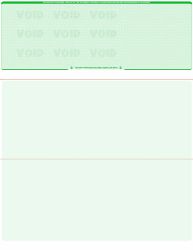
Method 2: Pre-Printed Check Stock , The Easier Path
The original content correctly identifies this path: "If you do not want to go through the process of creating and printing your own laser checks from home, there are many online businesses willing to do it for you, for a fee."
Pre-printed check stock works differently from blank check paper. The stock arrives with your static information already printed:
- Your business name and mailing address
- Your bank name
- Your ABA routing number , pre-encoded in certified MICR toner
- Your account number , pre-encoded in certified MICR toner
- Sequential check numbers
- Your logo (free black-and-white printing on every Checkomatic order)
- Your chosen background design and color
When you run a print job from your accounting software, the software fills in only the variable fields: payee name, dollar amount, payment date, and memo. You load the stock into your standard laser or inkjet printer, click print, sign the printed check, and send it.
Browse all laser check formats for home and office use at computer checks for business.
https://www.checkomatic.com/business-checks-on-bottom
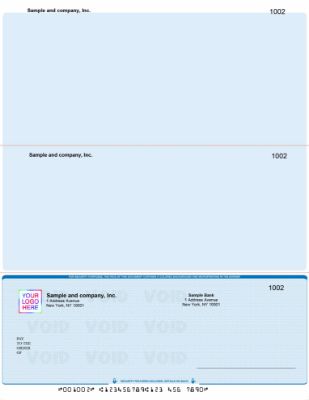
Which Accounting Software Works for Laser Check Printing
The original content mentions QuickBooks as the primary example of software used with laser checks. The range of compatible platforms is much broader. Any accounting software that supports check printing can be used to print laser checks from your computer.
Most Commonly Used Platforms
- QuickBooks Desktop (Pro, Premier, Enterprise): Default check format is voucher (check on top with two stubs). Most popular for home business payroll and accounts payable.
- QuickBooks Online: Supports the same voucher, standard, and wallet formats as Desktop. Navigate to the plus icon, then Print Checks.
- Quicken: Compatible with laser check stock. Home business favorite for personal-style check printing.
- Sage 50 (Peachtree): Default format is check in middle. Pre-printed stock must match this format.
- MYOB: Compatible with standard business check formats.
- Xero: Supports check printing with appropriate third-party print templates.
For QuickBooks-specific laser check formats pre-calibrated to match QuickBooks print templates, see QuickBooks checks at Checkomatic. For details on the five benefits of switching to laser checks from handwritten checks, see five benefits of using laser checks.
Printer Requirements for Laser Check Printing
Laser Printers
The original content references the HP LaserJet as the example that made home laser check printing possible. Standard laser printers , including current HP, Brother, Canon, and Xerox models , all work with pre-printed check stock. Laser printers produce sharper output than inkjet, handle higher print volumes, and are preferred for home businesses printing checks regularly.
Inkjet Printers
Standard inkjet printers work with pre-printed check stock for most banks. As the original content notes, most banks today process checks optically rather than magnetically. Since the MICR line is already printed on pre-printed stock using certified magnetic toner, your inkjet printer only needs to add the variable data fields , which do not require magnetic ink.
Do You Need MICR Toner?
For pre-printed check stock: in most cases, no. The MICR line is already on the stock. For blank check paper (Method 1): yes. Your printer must print the MICR line using magnetic toner. Call your bank before investing in MICR toner to confirm whether they process checks optically or magnetically. Most major US banks use optical processing as of 2026.
Check Design: Logo, Background, and Customization
The original content makes an important point: your checks are like a business card. They reflect your business to every vendor, employee, and client who receives one. Checkomatic gives you full control over your laser check design.
Logo Printing
Free black-and-white logo printing on every order regardless of quantity. Upload your logo file at checkout in vector or high-resolution PNG format. The logo prints in the upper left corner of every check in the batch. Color logo printing is available for a small additional fee.
Background Colors and Designs
Twenty background design options across diamond, marble, and prismatic textures. Colors include blue, burgundy, gold, green, brown, green-blue, and blue-red. The background design is part of what gives laser checks their professional appearance compared to plain handwritten checks.
All Information Pre-Printed
Your company name, mailing address, bank name, routing number, account number, and check numbers are pre-printed on every sheet. Your accounting software adds the remaining variable information at print time. Nothing is generic. Every sheet ships customized to your specific business and account.
For the complete guide to getting the most out of check customization, see what is the best place to order checks online. For the full step-by-step guide to setting up laser check printing with accounting software, see how to print laser checks.
Security Features Every Laser Check Should Have
The original content correctly emphasizes the importance of choosing a check supplier that uses encryption to protect your banking information. The security of the check itself is equally important.
Every Checkomatic laser check includes six security features built into the paper and printing at the base price:
- Chemically sensitive paper: Reacts visibly when solvents used in check washing contact the paper. Leaves a permanent stain that bank tellers identify as tampering evidence.
- Microprinting: Text printed at under one point size along the signature line that appears as a solid line visually but degrades to a blur on any photocopy or scan.
- Void pantograph: A hidden pattern in the check background that displays the word VOID when the check is photocopied or scanned.
- UV fluorescent fibers: Embedded in the paper during manufacturing. Glow under ultraviolet light used by bank authentication equipment.
- Heat-sensitive ink: Disappears when rubbed with a finger and reappears when released. An instant physical verification step anyone can perform.
- Genuine watermark: Embedded during paper manufacturing. Appears when the check is held to light. Cannot be added to paper after the fact.
No security upgrade fee. All six features are standard on every laser check order from Checkomatic regardless of format or quantity.
Accepted by the World's Leading Banks
Every laser check from Checkomatic meets and exceeds ABA (American Bankers Association) specifications. The MICR line is pre-printed in certified magnetic iron oxide toner and verified against the Federal Reserve E-Payments Routing Directory before production begins. Laser checks printed from any computer using Checkomatic pre-printed stock clear at any US bank without rejection. ABA compliance is standard on every order. For current delivery options including rush production, see shipping and handling. Browse all laser check formats at business checks.
What Customers Say About Checkomatic Laser Checks
All reviews below are published on checkomatic.com and reproduced verbatim. Source: checkomatic.com/quickbooks-starter-pack-product, 4.5 stars from 166 verified reviews.
"First time ordering and I am super impressed with the quality of the checks. No issues with delivery. I will be ordering again!"
TClinton | ★★★★★ 5/5 | April 9, 2025 | Source: checkomatic.com/quickbooks-starter-pack-product
"Been with them for 15 years. Always reliable, always good quality, good service. What more can you ask for?"
ATV Inc. | ★★★★★ 5/5 | April 5, 2024 | Source: checkomatic.com/quickbooks-starter-pack-product
"I got 500 checks for less than half of what the bank wanted for 200!"
VVA Voucher Checks (Vietnam Veterans of America) | ★★★★★ 5/5 | July 6, 2024 | Source: checkomatic.com/quickbooks-starter-pack-product
"We use CheckoMatic for all of our check needs! They have great prices and we receive our products in a timely manner!"
CG's Tax Service | ★★★★★ 5/5 | September 18, 2024 | Source: checkomatic.com/quickbooks-starter-pack-product
"ASJ Wilson Construction has been a client of checkomatic for some years now and they've never disappointed this company. Thank you checkomatic for all that you do."
ASJ Wilson Construction | ★★★★★ 5/5 | June 6, 2024 | Source: checkomatic.com/quickbooks-starter-pack-product
"Affordable and efficient. My go-to business check printer."
Doe | ★★★★★ 5/5 | January 24, 2025 | Source: checkomatic.com/quickbooks-starter-pack-product
Why Choose Checkomatic for Laser Checks
Pre-Printed Stock for Any Computer and Any Printer
Checkomatic's pre-printed laser check stock works with standard laser and inkjet printers. No MICR toner required for most banks. No special equipment to buy. Load the stock, run the print job from your accounting software, sign, and send.
Compatible With Over 500 Accounting Platforms
QuickBooks Desktop, QuickBooks Online, Quicken, Sage 50, MYOB, Xero, Microsoft Dynamics, Peachtree, and over 500 other platforms. Stock is pre-calibrated to match your software's print template. Alignment is correct on the first print without test runs or adjustment.
Free Logo Printing on Every Order
Black-and-white logo printing is included on every laser check order at no extra charge. As the original content notes, your checks reflect your business identity. A professional-looking check with your logo makes a better impression than a generic one.
Six Security Features at the Base Price
No security tier upgrade needed. All six features , chemically sensitive paper, microprinting, void pantograph, UV fluorescent fibers, heat-sensitive ink, and genuine watermark , are standard on every order.
In-House Manufacturing Since 1997
All laser checks are manufactured at Checkomatic's own facility in Monroe, NY. Standard production ships in 3 to 5 business days. ABA routing numbers are verified against the Federal Reserve E-Payments Routing Directory before production. SSL-encrypted checkout protects your banking information , exactly as the original content recommends. Browse all formats at computer checks for business.





