


Do Sole Proprietors Need Business Checks?
The short answer is no, not legally. A sole proprietorship is not a separate legal entity from its owner. The IRS treats the business and the owner as one and the same. This means a sole proprietor can legally write personal checks to pay business expenses, accept personal checks as business income, and deposit everything in a single personal bank account without violating any law.
The long answer is that you should get them anyway, for practical rather than legal reasons. Here is why.
The Tax Recordkeeping Problem
Every business expense you pay with a personal check must be identified, documented, and separated at tax time to claim it as a Schedule C deduction. If your business and personal transactions are in the same account, every year end involves reconstructing which transactions were business and which were personal. If you are ever audited by the IRS, the burden of proof for every mixed-account deduction falls on you. Clean, dedicated business check records eliminate this reconstruction work entirely.
The Professional Credibility Point
A check drawn on "Jane Smith" looks different to a vendor or contractor than a check drawn on "Jane Smith Consulting." The business name on the check signals that you operate as a business, not as an individual writing a personal payment. Vendors deposit business checks more readily than personal checks from unknown individuals, and contractors treating your payment as a business transaction are more likely to issue proper 1099-NEC documentation.
The Low-Cost Threshold
Business checks from a direct printer cost $0.15 to $0.25 per check. At 20 checks per month, the check stock cost is $3 to $5 per month. The accounting cleanup from mixed accounts typically costs multiples of that in professional accounting time. For any sole proprietor writing more than a handful of checks per month, dedicated business checks pay for themselves.
Personal Checks vs Business Checks for Sole Proprietors
| Factor | Personal Check | Business Check |
|---|---|---|
| Legally valid for business? | ✅ Yes | ✅ Yes |
| Schedule C recordkeeping | ❌ Manual reconstruction required | ✅ Clean , all business in one account |
| Appears on check | Your personal name | Your business name (DBA or entity) |
| Two stubs for records | ❌ Small single stub only | ✅ Two stubs , payer and payee copies |
| Software compatible | ❌ No | ✅ Yes , QuickBooks, Xero, Sage, etc. |
| Professional appearance | Personal name only | Business name + logo option |
| IRS audit readiness | ⚠️ Mixed , harder to prove business use | ✅ Clean , dedicated business account |
| Cost from Checkomatic | Very low | Slightly higher , minimal difference |
For a complete breakdown of the differences between personal and business checks, see what's the difference between personal and business checks. For the full comparison of when to use each, see business checks vs personal checks: what's the real difference.
DBA Accounts and Ordering Business Checks as a Sole Proprietor
Most sole proprietors operate under either their personal name or a DBA (Doing Business As) business name. Understanding which name to use on your business checks matters more than most new sole proprietors realize.
What Is a DBA?
A DBA is a fictitious business name or trade name that a sole proprietor files with their state or county to operate under a business name other than their own legal name. For example, a freelance graphic designer named Maria Gonzalez might file a DBA as "Gonzalez Design Studio." She is still legally a sole proprietor, not an LLC or corporation, but she can open a business bank account in the name "Maria Gonzalez DBA Gonzalez Design Studio" and accept payments made out to "Gonzalez Design Studio."
Which Name Goes on Your Business Check?
The name on your business check should match the name your bank has registered for the account exactly. If your account is in the name "Maria Gonzalez DBA Gonzalez Design Studio," the check should reflect that. Most sole proprietors choose to print just the DBA business name for a cleaner look, but confirm with your bank what name variation they require on checks before ordering.
When ordering from Checkomatic, you enter your business name, address, bank routing number, and account number exactly as they appear on your bank account. The name you enter is what prints on the check. Take a moment to confirm this matches your bank's records before finalizing the order.
Do You Need a Separate Business Bank Account?
Legally, sole proprietors are not required to have a separate business bank account. But if you want checks that carry your business name rather than your personal name, you need a business checking account (or a DBA account) to provide the routing and account numbers. Most US banks and credit unions open business checking accounts for sole proprietors and DBA operators, often with the same documentation required for any business account: your DBA filing certificate, your Social Security number or EIN, and personal identification.
Which Business Check Format Fits a Sole Proprietor
The right check format for a sole proprietor depends on two things: how you write checks and how many you write per month.
| Your Situation | Right Format | Why |
|---|---|---|
| Write checks by hand, no accounting software | Manual check (deskbook or wallet) | No printer needed , write at desk or on the go |
| Use QuickBooks, Xero, or Quicken for bookkeeping | Computer check (check-on-top) | Prints directly from software , auto-fills all fields |
| Frequently write checks away from office | Manual check (binder format) | Portable , write at client sites, meetings, job locations |
| Low volume (1-5 checks per month) | Manual check or personal check | Computer check setup overhead not worth it at low volume |
| Higher volume (10+ checks per month) | Computer check | Faster, fewer errors, cleaner records |
| Pay contractors who need remittance detail | Voucher check (check-on-top with stubs) | Two stubs carry project reference, invoice number detail |
Manual Checks for Sole Proprietors
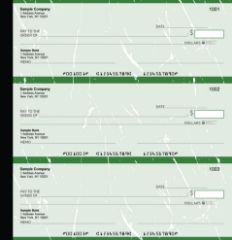
Manual executive deskbook checks from Checkomatic , the portable check format for sole proprietors who write checks by hand or away from the office.
Manual checks are handwritten business checks in a binder or deskbook format. They do not require a printer, a computer, or any accounting software. You open the binder, write the check by hand, tear it out, and hand it to the payee or mail it. The small stub next to each check lets you note the date, payee, amount, and purpose immediately after writing.
When Manual Checks Are the Right Choice
Manual checks make the most sense for sole proprietors who:
- Do not use accounting software to manage their books
- Write only a few checks per month , not worth setting up computer printing for low volume
- Frequently need to write checks at client locations, job sites, or meetings where a printer is not available
- Prefer the control and simplicity of handwriting each payment rather than running a software print job
- Are just starting their business and want to keep setup simple before committing to an accounting platform
The executive deskbook format is popular among self-employed professionals who carry checks to client meetings. The binder format is compact enough for a briefcase or laptop bag. For the full range of manual check options, see manual checks.
Computer Checks for Sole Proprietors Using QuickBooks
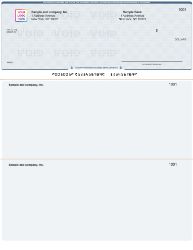
QuickBooks-compatible computer checks from Checkomatic , pre-formatted for sole proprietors using accounting software, with payee, amount, and date filled in automatically at print time.
Computer checks are pre-printed check stock that your accounting software completes at print time. Your business name, address, bank routing number, and account number are already on the paper when it arrives from Checkomatic. When you run a check print job in QuickBooks or another platform, the software outputs the payee name, date, dollar amount, and memo to the correct fields. You sign and mail.
Why Computer Checks Make Sense for Software-Using Sole Proprietors
If you use QuickBooks, Xero, Quicken, or any other accounting platform to track your business income and expenses, computer checks integrate your payment process directly into your bookkeeping. Every check you print from the software creates a transaction record automatically in your accounts. Your vendor payments, contractor fees, and business expenses are logged as you pay them, not reconstructed later from bank statements. This is the cleanest possible recordkeeping for a sole proprietor's Schedule C.
Which Computer Check Format for a Sole Proprietor
Check-on-top is the correct format for most sole proprietors using QuickBooks, Xero, or Quicken. It is the default print template for all three platforms. The check prints at the top of the 8.5 x 11 sheet with two stubs below it. One stub goes to the payee. The second stub stays in your files as your business record of the payment. For the QuickBooks-compatible range, see QuickBooks checks. For the full computer check range, see computer checks.
How to Pay Yourself as a Sole Proprietor by Check
Sole proprietors pay themselves through owner draws, not through payroll. Understanding the difference matters for how you record the payment and how you handle taxes.
What Is an Owner Draw?
An owner draw is a transfer of funds from your business bank account to yourself personally. You write a check from your business checking account made out to yourself, note it as "Owner Draw" in your check stub and bookkeeping records, and deposit it in your personal bank account. Owner draws do not have payroll taxes withheld because sole proprietors pay self-employment tax on their total net business profit at tax time, not on each individual draw.
How to Record an Owner Draw on a Business Check
When writing a check to yourself as an owner draw:
- Make the check out to your own legal name
- Write "Owner Draw" or "Owner Distribution" in the memo field
- Note the same in your check stub for your business records
- Record the draw in your bookkeeping software as an owner draw (not as a business expense or payroll)
- Deposit the check in your personal account
Owner draws are not tax-deductible business expenses. They reduce your business bank balance but do not reduce your taxable business profit on Schedule C. Your Schedule C profit, after all legitimate business expense deductions, is what you pay self-employment tax on, regardless of how much you drew from the business during the year.
Tax and Recordkeeping Benefits of Dedicated Business Checks for Sole Proprietors
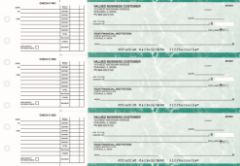
Business checks for sole proprietors , two stubs per check for clean business expense documentation, directly supporting Schedule C tax filing.
Schedule C Deduction Documentation
Every legitimate business expense you pay by check can be deducted on Schedule C of your federal tax return. A dedicated business check account creates a complete, timestamped, amount-specific record of every business payment in one place. When tax season arrives, your check register and business bank statement are the primary documentation for your deductions. If you pay business expenses from a personal account mixed with personal spending, demonstrating to the IRS that a specific payment was a business expense , and not personal , requires additional documentation for every transaction.
Contractor Payment Records and 1099-NEC
Sole proprietors who hire independent contractors and pay them $600 or more per year are required to issue a 1099-NEC to each contractor and file a copy with the IRS. Your business check records are your primary source for calculating total payments to each contractor. A dedicated business check account makes this calculation simple: review your check register, total the payments to each contractor, and issue the 1099. Mixed personal and business accounts require cross-referencing bank statements and receipts to identify contractor payments, which takes significantly more time.
Business Bank Account Separation as a Best Practice
Even though the IRS does not require sole proprietors to maintain separate business accounts, every tax professional recommends it. The reason is simple: the more clearly you can demonstrate that your business expenses are truly business-related, the stronger your deduction position in the event of an audit. Dedicated business checks, drawn on a dedicated business bank account, with clear stub documentation for each payment, are the foundation of that demonstration.
Security Features on Sole Proprietor Business Checks
Whether you are a self-employed consultant, a freelance designer, a one-person contractor, or a sole proprietor running a small retail operation, the checks you write face the same fraud risks as checks written by larger companies. Check washing, alteration, and counterfeiting affect businesses of every size.
Every Checkomatic business check includes standard security features that protect sole proprietor payments:
- Chemical-reactive paper: Stains visibly when check-washing solvents are applied, revealing any alteration attempt.
- Microprint signature line: Appears as a thin line but is actually repeating tiny text that blurs on photocopies, flagging reproductions.
- Void pantograph: Background pattern that makes VOID appear clearly when the check is photocopied or scanned.
- Heat-sensitive ink: Disappears when pressed with a warm thumb , an authenticity test bank tellers apply to suspicious checks.
- ANSI E13-B certified MICR encoding: Routing and account numbers encoded to the standard all US bank automated processing systems require.
For the complete guide to check security features and which matter most for your specific risk situation, see are business checks safe: security features that actually matter.
What Customers Say About Checkomatic
All reviews below are published on checkomatic.com and reproduced verbatim. Source: checkomatic.com/quickbooks-starter-pack-product, 4.5 stars from 166 verified reviews.
"Been with them for 15 years. Always reliable, always good quality, good service. What more can you ask for?"
ATV Inc. | ★★★★★ 5/5 | April 5, 2024 | Source: checkomatic.com/quickbooks-starter-pack-product
"First time ordering and I am super impressed with the quality of the checks. No issues with delivery. I will be ordering again!"
TClinton | ★★★★★ 5/5 | April 9, 2025 | Source: checkomatic.com/quickbooks-starter-pack-product
"We use CheckoMatic for all of our check needs! They have great prices and we receive our products in a timely manner!"
CG's Tax Service | ★★★★★ 5/5 | September 18, 2024 | Source: checkomatic.com/quickbooks-starter-pack-product
"I got 500 checks for less than half of what the bank wanted for 200!"
VVA Voucher Checks (Vietnam Veterans of America) | ★★★★★ 5/5 | July 6, 2024 | Source: checkomatic.com/quickbooks-starter-pack-product
"ASJ Wilson Construction has been a client of checkomatic for some years now and they've never disappointed this company. Thank you checkomatic for all that you do."
ASJ Wilson Construction | ★★★★★ 5/5 | June 6, 2024 | Source: checkomatic.com/quickbooks-starter-pack-product
"Affordable and efficient. My go-to business check printer."
Doe | ★★★★★ 5/5 | January 24, 2025 | Source: checkomatic.com/quickbooks-starter-pack-product
Why Choose Checkomatic for Sole Proprietor Business Checks
Both Formats for Every Sole Proprietor Situation
Whether you write checks by hand or print them from QuickBooks, Checkomatic has the format you need. Manual checks in binder and deskbook format for portable, handwritten check writing. Computer checks in check-on-top format for QuickBooks and other accounting platforms. Both come with all standard security features included at the base price. For the full range, see business checks, manual checks, and computer checks.
Order Small to Start
Sole proprietors just setting up their first business check account can order a small starting quantity. Checkomatic offers checks from 50 units, making it practical to start small, verify the format and print alignment, and reorder in bulk once you are confident the setup is right. For ordering guidance and quantity recommendations, see what is the best place to order checks online.
More Affordable Than Bank-Issued Checks
Most banks charge $20 to $35 for a box of business checks at the branch. Checkomatic's checks are a fraction of that per check, with bulk order discounts that reduce the per-check cost further at higher quantities. For a sole proprietor who is cost-conscious by necessity, this cost difference adds up significantly over the life of the business.
Software Compatibility Verified Before Shipping
Checkomatic pre-formats computer check stock to match QuickBooks, Quicken, Xero, Sage, MYOB, and most other accounting platforms sole proprietors use. Every order is verified before shipping to confirm the routing number matches the Federal Reserve's routing directory. For the complete QuickBooks check range, see QuickBooks checks. For the voucher vs wallet format comparison, see voucher checks vs wallet checks: which is right for your business.





