


What Is Positive Pay
Positive pay is a bank fraud prevention service that matches every check presented for payment against a list of checks your business actually issued. The bank only releases funds for checks that appear on your list with matching details. Every check that does not match is flagged for your review before any money moves.
The concept is simple: if you issued it, you can prove it. If you did not issue it, the bank stops it.
Positive pay addresses the most damaging types of check fraud directly. When a criminal alters the amount or payee name on a real check you wrote, positive pay catches the mismatch against your original issue record. When a criminal counterfeits a check using your routing and account number, positive pay flags it because the check number was never in your issue file. When a check appears that your business never wrote at all, positive pay rejects it automatically.
Most business banking accounts offer positive pay as a free or low-cost add-on service. The time cost is uploading a check issue file after each check run , a process that takes a few minutes for most businesses using accounting software like QuickBooks. For a complete overview of the security features that complement positive pay on the check stock itself, see the guide on what are the most important features of business checks.
How Positive Pay Works Step by Step
Positive pay runs in the background of every check your business issues. Here is the complete process from issuance to clearance.
Step 1: Issue Checks From Your Business Account
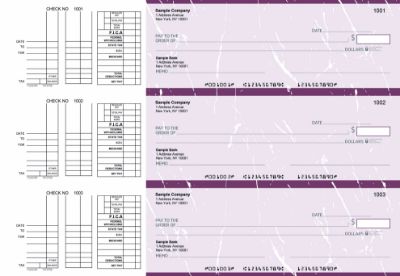
You write checks or print them through your accounting software. Each check carries a unique sequential check number pre-printed on the stock. Your accounting software records the check number, payee name, and dollar amount for every check in the batch.
Step 2: Transmit Your Check Issue File to the Bank
After issuing checks, you upload a check issue file to your bank. This file contains one record per check: the check number, dollar amount, and payee name. Most banks accept this file through their online business banking portal. Some accept it via secure file transfer. Some accounting platforms including QuickBooks can generate and transmit this file directly. The issue file must be uploaded before the checks you issued can be presented for payment , typically by the end of the same business day you issue checks, or by the bank's stated cutoff time.
Step 3: Your Check Reaches the Payee
The payee receives your check by mail or in person, endorses it, and deposits it at their bank. This step is identical to a standard check transaction.
Step 4: The Check Is Presented to Your Bank
The payee's bank sends the check through the check clearing system. Your bank receives the presented check with the check number, dollar amount, and payee name from the MICR line and check face.
Step 5: Your Bank Matches the Check Against Your Issue File
This is where positive pay does its work. Your bank's automated system compares the presented check against your issue file. It checks three data points: the check number, the dollar amount, and (if your bank offers payee positive pay) the payee name. If all three match an entry in your file, the check clears automatically. If any field does not match, or if the check number does not appear in your file at all, the bank creates an exception.
Three Types of Positive Pay
Not all positive pay services work the same way. Banks offer three variations, and understanding which your bank offers determines how you set it up and how much protection you get.
Standard Positive Pay
The most common form. You proactively transmit a check issue file to the bank after each check run. The bank compares presented checks against your file by check number and dollar amount. Any mismatch or unknown check number becomes an exception you must resolve. Standard positive pay is the most automated and lowest-maintenance form once set up, because the daily review only covers exceptions rather than every check.
Reverse Positive Pay
In reverse positive pay, the bank sends you a daily report of all checks presented for payment against your account. You review the list and flag any checks you did not issue or any amounts that are incorrect. The bank then returns flagged checks and pays the rest.
Reverse positive pay places more of the review burden on your team because you review every presented check rather than just exceptions. It is simpler to set up because you do not maintain an issue file. It is appropriate for smaller businesses with lower check volumes or for businesses whose banking setup does not support standard issue file transmission.
Payee Positive Pay
An enhanced version of standard positive pay that adds payee name matching to the check number and amount verification. In standard positive pay, a criminal who alters only the payee name on a real check while keeping the correct amount and check number may pass the match. Payee positive pay catches this scenario by comparing the payee name on the presented check against the payee name in your issue file.
Payee positive pay requires that your issue file include the payee name for every check and that the name on the check face matches your file exactly. This is more demanding to maintain , a payee name with a minor spelling difference between your records and the check face can generate false exceptions. It offers the highest level of protection against payee name fraud when maintained correctly.
What Fraud Positive Pay Prevents
Positive pay targets three specific fraud scenarios that cause significant financial losses for businesses every year.
Altered Checks
A criminal intercepts a legitimate check you issued, changes the payee name or dollar amount, and deposits the modified check. Standard positive pay catches amount alterations because the presented amount does not match your issue file. Payee positive pay also catches payee name alterations. Without positive pay, altered checks can clear before the fraud is discovered, and recovery depends on your bank's fraud investigation process and timing.
Check washing is a particularly common form of alteration fraud. A criminal uses chemical solvents to erase the ink on a real check and rewrites a new payee and amount. Positive pay catches this because the rewritten amount differs from your issue file record. For a full guide on how check washing works and how security-featured check stock resists it, see how QuickBooks checks prevent check washing.
Counterfeited Checks
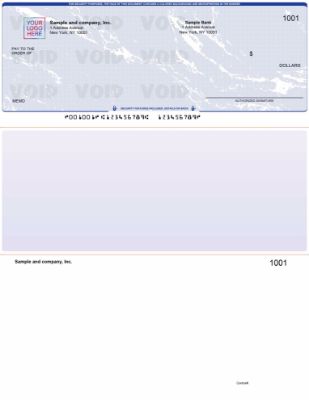
A criminal creates a fake check using your business name, routing number, and account number , information visible on any check you write. The counterfeited check has a check number your business never assigned. Positive pay catches this because the check number does not appear in your issue file. The bank flags it as an exception immediately.
Checks Your Business Never Issued
A check appears for payment that your business simply never wrote. This can happen through account information theft, internal fraud, or mistaken routing. Any check number not in your issue file is automatically flagged as an exception regardless of whether the amount and payee look plausible.
How Positive Pay Handles Exceptions
An exception is any check presented for payment that does not match an entry in your issue file. When an exception occurs, your bank notifies you , typically by email or through a banking portal alert , and gives you a decision deadline.
The Exception Decision
You have two choices for each exception: pay or return. If you choose to pay, the bank releases the funds and the check clears. If you choose to return, the bank sends the check back unpaid. Most banks give you until a stated cutoff time on the same business day to make the decision , often 10 AM or 12 PM Eastern. If you do not respond by the cutoff, the bank applies its default decision, which is either pay or return depending on how you configured the service at setup.
Legitimate Exceptions
Not every exception is fraud. Exceptions also happen when: you forgot to upload the issue file for a check batch, you issued a replacement check with a corrected amount but uploaded the original amount, you made a data entry error in the issue file, or the payee name in your file does not exactly match the name on the check face (in payee positive pay). A well-run positive pay process minimizes legitimate exceptions through consistent issue file uploads and accurate data entry.
How to Set Up Positive Pay With Your Bank
Setting up positive pay involves four steps. The exact process varies by bank, but the sequence is consistent.
Step 1: Contact Your Bank
Call or log into your business banking portal and ask about positive pay for your checking account. Confirm which type is available (standard, reverse, or payee), what the cost is (many banks offer it free), and what file format they require for issue file uploads.
Step 2: Confirm the Issue File Format
Your bank will specify the exact file format they accept for check issue data. Common formats include CSV, fixed-width text, or BAI2. Your accounting software must be able to export check issue data in that format. QuickBooks can export check data that most banks accept with minor formatting. If your software cannot generate the required format automatically, your bank's treasury management team can often provide a spreadsheet template you can fill in manually.
Step 3: Verify Your Check Number Sequence
Positive pay relies on sequential, unique check numbers. Before enrolling, confirm that your current check stock has a clear, consistent sequential numbering starting point, and that your accounting software and physical check supply are synchronized. Any gap or duplication in check numbers creates exceptions from the first day of enrollment. For help confirming your current check number sequence, see the guide on maintaining an accurate check register.
Step 4: Establish Your Internal Upload Process
Positive pay only works if someone uploads the issue file consistently and on time. Establish a clear internal process: who uploads the issue file, when (same day as check issuance), and what happens if that person is unavailable. A missed upload means legitimate checks become exceptions, creating unnecessary work and potential payment delays.
What Check Stock Positive Pay Requires
Positive pay works by reading the MICR line at the bottom of each presented check. The bank's automated system extracts the check number, routing number, and account number from this line and uses the check number to look up your issue file entry. For positive pay to work accurately, your check stock must meet these requirements.

ABA-Compliant MICR Encoding
The routing number in your MICR line must be ABA-compliant and verified against the Federal Reserve E-Payments Routing Directory. An incorrect routing number causes checks to misroute through the clearing system before they even reach your bank's positive pay matching step. Checkomatic verifies every routing number against the Federal Reserve directory before production begins on every order.
Correct Sequential Check Numbers
Every check in your positive pay issue file is identified by its check number. The check number pre-printed on each check must match the check number your accounting software assigns to that payment. Pre-printed check stock from Checkomatic ships with sequential check numbers that sync with QuickBooks and other accounting platforms so your software check number and physical check number stay aligned automatically.
Consistent MICR Line Positioning
Bank reader-sorter machines read MICR lines at a specific position on the check. Off-center or incorrectly positioned MICR fields create read errors that generate false exceptions in your positive pay system. All Checkomatic business checks are manufactured to ABA specification for MICR line position, ensuring reliable automated reading at every bank.
Security Features That Complement Positive Pay
Positive pay is a banking layer of protection. The check stock itself is a physical layer. Using security-featured check stock alongside positive pay gives you two independent lines of defense. If a criminal attempts to alter a check, the chemically sensitive paper resists washing, the microprinting degrades on photocopies, and the void pantograph appears if the check is scanned. If the altered check still reaches the bank, positive pay catches the data mismatch. Both layers working together significantly reduce the probability of a successful fraud attempt.
For all business check formats compatible with positive pay and accounting software, see business checks and QuickBooks checks at Checkomatic.
Who Needs Positive Pay
Positive pay is beneficial for any business that writes checks, but it is particularly important for businesses in these situations.
Businesses That Mail Checks Regularly
Every check that goes into outgoing mail is a potential target. Checks stolen from mailboxes are a primary source of altered check fraud. Positive pay catches alterations when the modified check is presented, providing a second line of defense after the check leaves your hands.
High-Value Accounts Payable Operations
A $50,000 vendor payment that gets altered to $500,000 is a catastrophic loss. High-value payments deserve the extra verification layer that positive pay provides. At larger payment amounts, the cost of a single fraud incident far exceeds years of positive pay maintenance time.
Construction, Property Management, and Nonprofits
These industries see elevated check fraud rates because they typically write large numbers of checks to a diverse set of payees, making it harder to spot an unauthorized check before it clears. Positive pay automates the verification that would otherwise require manual review of every cleared check.
Businesses That Have Experienced Check Fraud Before
A business that has experienced check fraud once is at higher risk of being targeted again. Positive pay removes the vulnerability by making every check traceable to a specific issued record.
Businesses Using Payroll Checks
Payroll checks are particularly attractive fraud targets because they are issued on a predictable schedule, often for similar amounts, and employees receive them directly , making it easier for a criminal to study the check format. Positive pay verifies every payroll check number and amount against your payroll issue file. For the complete guide to payroll check security, see business checks for payroll.
Common Positive Pay Mistakes
Mistake 1: Not Uploading the Issue File on the Same Day
If you issue checks on Monday but do not upload the issue file until Wednesday, checks mailed Monday may have already been deposited and presented for payment. The bank flags them as exceptions because they are not yet in your file. Legitimate checks get held up while you confirm them. Always upload the issue file the same day you issue checks.
Mistake 2: Setting the Default Exception Decision to "Pay"
If your team misses an exception deadline and your default is "pay," the exception clears automatically , including fraudulent checks. Set your default to "return" and establish a process to review exceptions every morning before your bank's cutoff time.
Mistake 3: Inconsistent Check Numbering
Reusing check numbers, skipping numbers, or allowing your software check number and physical check number to fall out of sync creates constant false exceptions. Every check in every batch must have a unique sequential number that matches between your issue file and the physical check. Maintain your check register carefully to track every check number used. See the full guide to check register maintenance.
Mistake 4: Not Enrolling in Payee Positive Pay
Standard positive pay matches check number and amount but not payee name. A criminal who alters only the payee name while keeping the correct amount and check number passes standard positive pay. If your bank offers payee positive pay, the additional protection is worth the extra effort of maintaining accurate payee names in your issue file.
Mistake 5: Using Check Stock With Non-Sequential Numbers
Ordering check stock that does not continue your existing sequential numbering creates immediate confusion in your positive pay system. Always order replacement check stock that picks up your sequential numbering exactly where your current supply ends. For guidance on maintaining check number continuity across reorders, see how to reorder business checks online.
What Customers Say About Checkomatic
All reviews below are published on checkomatic.com and reproduced verbatim. Source: checkomatic.com/quickbooks-starter-pack-product, 4.5 stars from 166 verified reviews.
"Been with them for 15 years. Always reliable, always good quality, good service. What more can you ask for?"
ATV Inc. | ★★★★★ 5/5 | April 5, 2024 | Source: checkomatic.com/quickbooks-starter-pack-product
"ASJ Wilson Construction has been a client of checkomatic for some years now and they've never disappointed this company. Thank you checkomatic for all that you do."
ASJ Wilson Construction | ★★★★★ 5/5 | June 6, 2024 | Source: checkomatic.com/quickbooks-starter-pack-product
"We use CheckoMatic for all of our check needs! They have great prices and we receive our products in a timely manner!"
CG's Tax Service | ★★★★★ 5/5 | September 18, 2024 | Source: checkomatic.com/quickbooks-starter-pack-product
"First time ordering and I am super impressed with the quality of the checks. No issues with delivery. I will be ordering again!"
TClinton | ★★★★★ 5/5 | April 9, 2025 | Source: checkomatic.com/quickbooks-starter-pack-product
"I got 500 checks for less than half of what the bank wanted for 200!"
VVA Voucher Checks (Vietnam Veterans of America) | ★★★★★ 5/5 | July 6, 2024 | Source: checkomatic.com/quickbooks-starter-pack-product
"Affordable and efficient. My go-to business check printer."
Doe | ★★★★★ 5/5 | January 24, 2025 | Source: checkomatic.com/quickbooks-starter-pack-product
Why Choose Checkomatic for Positive Pay Compatible Business Checks
ABA-Verified MICR on Every Order
Every routing number is verified against the Federal Reserve E-Payments Routing Directory before production begins. Correct MICR encoding is the foundation of positive pay accuracy. Incorrect routing numbers cause misrouting and failed matching before positive pay even runs. Checkomatic's manufacturing process eliminates this risk on every order.
Pre-Printed Sequential Check Numbers
Every Checkomatic business check ships with sequential check numbers pre-printed in the correct MICR field position. Your accounting software check number and physical check number stay synchronized, minimizing the legitimate exceptions that waste your team's time during positive pay reviews.
Formatted to Match Your Accounting Software
Checkomatic business checks are pre-calibrated to match QuickBooks, Sage, MYOB, Xero, and over 500 other accounting platforms. This matters for positive pay because your software generates both the physical check and the issue file data. When both use the same check number sequence and formatting, your positive pay data is accurate from the first batch. Browse all formats at computer checks for business.
Six Security Features Standard on Every Check
Positive pay catches data mismatches. Security-featured check stock resists physical tampering before mismatches occur. Checkomatic includes chemically sensitive paper, microprinting, void pantograph, UV fluorescent fibers, heat-sensitive ink, and genuine watermark on every business check order at the base price. No security upgrade fee. Two independent fraud defense layers on every check you issue.
In-House Manufacturing Since 1997
All checks manufactured at Checkomatic's own facility in Monroe, NY. No third-party printers. Consistent quality and specification compliance on every order. Standard production ships in 3 to 5 business days. For the complete range, see business checks and QuickBooks checks.





