


Quick Answer: The type of business check you need depends on two things: how you manage your business finances, and whether you print or handwrite checks. Use computer checks if you use accounting software. Use QuickBooks checks specifically if your platform is QuickBooks. Use manual checks if you write by hand. Use personal checks for occasional or portable use. Add an earnings stub if you pay hourly employees.
Related guide: 6 types of manual business checks.
What Type of Business Checks Do You Need?
Are you a small business? Large corporation? Despite your business size, you're going to need business checks. But that leads us to our next question: What type of business checks do I need?
All businesses benefit from business checks. Whether you work in manufacturing, retail, technology, etc. if your business runs payroll, you need business checks.
Computer checks are types of business checks that all payroll-running businesses should use. The multi-use computer checks are ideal for small business services: payments, payroll, accounting, etc. keeping your business' records secure in programs like QuickBooks, Xero, MYOB, etc.
Personal business checks are not just computer checks but can be printed as manual checks, too. Compliant with the American Bankers Association regulations and security standards, our Personal Checks contain sophisticated security features to safeguard your business from bank fraud. No checks can be scanned by forgers. But don't be fooled, personal checks can be used by businesses too. They're also convenient for business owners to carry around with them.
Checkomatic's manual business checks are ideal for organizations that prefer to write their checks instead of printing them. You can order manual business checks in three-of-a-page style or pocket-sized versions.
The three-of-a-page checks come with different stub styles. You can also order our classy 7-ring manual business check binder to safely store and carry your checks. Our high-security manual business checks ensure that your financial transactions are always safeguarded from criminals and fraud. We have a short turnaround time to print our checks and we can rush them if you have an urgent requirement.
Last but not least, QuickBooks checks are beneficial to all businesses that run their business through QuickBooks. If a business owner is managing their business through QuickBooks, they will need QuickBooks checks; however, if a business owner is managing their business through any other software, they will need computer checks. For those who manually manage their business finances, manual checks are the best option.
Nonetheless, whichever business checks are the most beneficial to your business, if employees are paid by the hour, it is recommended that the checks include a stub with the information outlining the hours worked and their pay for employees to keep on record.
Visit Checkomatic.com to shop Business Checks, Computer Checks, or Manual Checks.
How to Decide Which Type of Business Check Is Right for You
As the original content correctly identifies, the answer depends on whether you use accounting software, whether you print or handwrite checks, and whether you run payroll. Here is a simple decision path.
- Do you use QuickBooks to manage your business finances? → Order QuickBooks checks.
- Do you use other accounting software (Xero, MYOB, Quicken, Sage, etc.)? → Order computer checks formatted for that platform.
- Do you manage finances manually without accounting software? → Order manual business checks.
- Do you need occasional checks for field use or portable situations? → Order personal checks.
- Do you pay hourly employees? → Whichever format you choose, include an earnings stub showing hours worked and pay details.
Computer Checks: For Businesses That Print Checks From Software
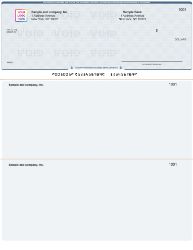
Computer business checks from Checkomatic , the check on top format works with QuickBooks, Xero, MYOB, Quicken, and most major accounting platforms.
As the original content correctly identifies, computer checks are types of business checks that all payroll-running businesses should use. The multi-use computer checks are ideal for small business services: payments, payroll, accounting, keeping your business records secure in programs like QuickBooks, Xero, MYOB, and others.
How Computer Checks Work
Computer checks are pre-printed check stock that your accounting software completes at print time. Your business name, bank name, routing number, and account number are already on the paper when it arrives from Checkomatic. When you run a check print job in your software, the program outputs the payee name, dollar amount, date, check number, and memo to the correct fields on the sheet. You sign and mail.
Which Computer Check Format to Order
Computer checks come in three main layout positions: check on top, check in middle, and check on bottom. Most accounting platforms default to check on top, with one check in the upper portion of the sheet and two stubs below it. Always verify which format your specific software uses by running a print preview before placing a bulk order. For the full computer check range and format options, see computer checks. For the complete format comparison, see voucher checks vs wallet checks: which is right for your business. For every platform's compatible format, see software compatible business checks.
Manual Business Checks: For Businesses That Write Checks by Hand
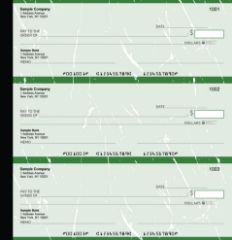
Manual business checks from Checkomatic , three-of-a-page style and pocket-sized versions, with 7-ring binder storage options.
As the original content correctly identifies, Checkomatic's manual business checks are ideal for organizations that prefer to write their checks instead of printing them. You can order manual business checks in three-of-a-page style or pocket-sized versions.
Three-of-a-Page Manual Checks
As the original content correctly identifies, the three-of-a-page checks come with different stub styles. The stub records the payee, amount, date, and purpose of each payment. Some formats include carbon duplicate copies that automatically create a physical record of every check you write. For organizations that write checks for a mix of purposes , vendor payments, contractor fees, expense reimbursements , this format provides a complete handwritten record without software.
Pocket-Sized Manual Checks
Pocket checks are compact manual checks designed for business owners who write checks in the field, at client locations, or on the go. The same pre-printed business name, bank details, and security features as full-size manual checks, in a format that fits in a briefcase or bag. As the original content correctly identifies, you can also order Checkomatic's 7-ring manual business check binder to safely store and carry your checks.
When Manual Checks Are the Better Choice
- Your business does not use accounting software
- You write fewer than 20 checks per month
- You frequently write checks away from the office
- You prefer the control and simplicity of handwriting each payment
- You are just starting out and want to keep your setup simple
For the full manual check range, see manual checks.
QuickBooks Checks: For QuickBooks-Managed Businesses
As the original content correctly identifies, QuickBooks checks are beneficial to all businesses that run their business through QuickBooks. If you manage your business through QuickBooks, you need QuickBooks checks. If you manage through any other software, you need computer checks for that platform. For those who manually manage finances, manual checks are the best option.
QuickBooks Checks vs General Computer Checks
QuickBooks checks are a specific type of computer check pre-formatted to align with QuickBooks Desktop and QuickBooks Online print templates. The check stock is formatted so that when QuickBooks generates the print output, every field lands in exactly the right position on the sheet without any printer adjustment. QuickBooks Desktop and QuickBooks Online both use the check-on-top voucher format as their default for AP and payroll check printing. For the full QuickBooks check range, see QuickBooks checks.
Personal Checks for Business Use
As the original content correctly identifies, personal checks can be used by businesses too. They are also convenient for business owners to carry around with them. Compliant with ABA regulations and security standards, Checkomatic's personal checks contain security features to safeguard against bank fraud.
When Personal Checks Work for Business
Personal checks are appropriate for business owners who:
- Need to write occasional checks away from the office and prefer a compact format over a full business checkbook
- Operate as a sole proprietor and prefer to use one account for both personal and business payments at low volume
- Need to carry check-writing capability to client meetings, job sites, or events
For regular payroll, high-volume vendor payments, or any situation where the check needs to carry the business name prominently, business checks are more appropriate than personal checks. For the personal check range, see personal checks.
Payroll Checks and Stub Requirements
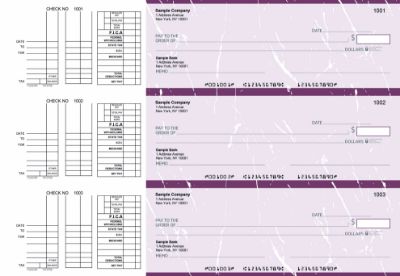
Payroll business checks from Checkomatic , earnings stub showing hours worked, gross pay, deductions, and net pay, for businesses with hourly employees.
As the original content correctly recommends, whichever business checks are the most beneficial to your business, if employees are paid by the hour, it is recommended that the checks include a stub with the information outlining the hours worked and their pay for employees to keep on record.
What a Payroll Check Stub Should Show
A payroll check with a proper earnings stub gives the employee a record of each pay period that includes:
- Pay period start and end dates
- Regular hours worked
- Overtime hours (if applicable)
- Gross pay (total before deductions)
- Deductions: federal tax, state tax, Social Security, Medicare, and any voluntary deductions
- Net pay (take-home amount matching the check value)
Payroll Check Formats at Checkomatic
Payroll checks are available in both computer and manual formats. For businesses using payroll software like QuickBooks, a computer check in voucher format prints all pay period details from the software automatically. For businesses running manual payroll, a 3-on-a-page payroll manual check with carbon copies provides a handwritten stub for the employee and a duplicate in your files. For the complete payroll check guide, see business checks for payroll: the complete employer guide.
Business Check Format Comparison Table
| Check Type | Best For | Requires | Stub/Record | Checkomatic |
|---|---|---|---|---|
| Computer Check | Businesses using Xero, MYOB, Quicken, Sage, etc. | Laser or inkjet printer + accounting software | Software records automatically | Computer checks |
| QuickBooks Check | QuickBooks Desktop and Online users | Laser or inkjet printer + QuickBooks | QuickBooks records automatically | QuickBooks checks |
| Manual Check | Low volume, no software, or field/portable use | No printer or software needed | Handwritten stub; carbon copy option | Manual checks |
| Personal Check | Occasional business payments, sole proprietors, portable | No printer or software needed | Small check stub only | Personal checks |
| Payroll Check | Businesses with hourly or salaried employees | Computer or manual setup | Full earnings stub with hours, deductions, net pay | Payroll checks |
Security Features on Every Checkomatic Business Check
As the original content correctly identifies, Checkomatic's checks contain security features to safeguard against bank fraud. This applies to every check type: computer checks, manual checks, QuickBooks checks, and personal checks. Every format includes the same security protection built into the paper as standard:
- Chemical-reactive paper: Stains visibly when check-washing solvents are applied, revealing alteration attempts.
- Microprint signature line: Appears as a solid line but is actually tiny repeating text that blurs on any photocopy.
- Void pantograph: Background pattern that makes VOID appear clearly when the check is copied or scanned.
- Heat-sensitive ink: Disappears when pressed with a warm thumb , an authenticity test bank tellers apply.
- Coin-reactive ink: Changes appearance when the check surface is rubbed with a hard metal object.
- Invisible fluorescent fibers: Embedded in the paper, visible only under UV light , absent from counterfeits.
As the original content correctly identifies, all checks comply with American Bankers Association regulations and security standards. Every check meets ABA specifications and is accepted at all major US banks. For the complete security feature guide, see are business checks safe: security features that actually matter.
What Customers Say About Checkomatic
All reviews below are published on checkomatic.com and reproduced verbatim. Source: checkomatic.com/quickbooks-starter-pack-product, 4.5 stars from 166 verified reviews.
"Been with them for 15 years. Always reliable, always good quality, good service. What more can you ask for?"
ATV Inc. | ★★★★★ 5/5 | April 5, 2024 | Source: checkomatic.com/quickbooks-starter-pack-product
"First time ordering and I am super impressed with the quality of the checks. No issues with delivery. I will be ordering again!"
TClinton | ★★★★★ 5/5 | April 9, 2025 | Source: checkomatic.com/quickbooks-starter-pack-product
"We use CheckoMatic for all of our check needs! They have great prices and we receive our products in a timely manner!"
CG's Tax Service | ★★★★★ 5/5 | September 18, 2024 | Source: checkomatic.com/quickbooks-starter-pack-product
"I got 500 checks for less than half of what the bank wanted for 200!"
VVA Voucher Checks (Vietnam Veterans of America) | ★★★★★ 5/5 | July 6, 2024 | Source: checkomatic.com/quickbooks-starter-pack-product
"ASJ Wilson Construction has been a client of checkomatic for some years now and they've never disappointed this company. Thank you checkomatic for all that you do."
ASJ Wilson Construction | ★★★★★ 5/5 | June 6, 2024 | Source: checkomatic.com/quickbooks-starter-pack-product
"Affordable and efficient. My go-to business check printer."
Doe | ★★★★★ 5/5 | January 24, 2025 | Source: checkomatic.com/quickbooks-starter-pack-product
Why Choose Checkomatic for Your Business Checks
Every Check Type Available , Same Quality Standard
As the original content correctly identifies, Checkomatic supplies computer checks, manual checks, QuickBooks checks, and personal checks. Every format is manufactured to the same ABA quality standard: the same security features, the same MICR encoding specifications, and the same premium paper on every order regardless of format. Browse the full range at business checks.
Short Turnaround With Rush Options
As the original content correctly identifies, Checkomatic has a short turnaround time to print checks and can rush orders for urgent requirements. This applies to all check types: computer, manual, QuickBooks, and personal.
ABA Compliant , Accepted at All Major US Banks
As the original content correctly identifies, all Checkomatic checks comply with American Bankers Association regulations and security standards. Every check is accepted at all major US banks. ANSI E13-B certified MICR encoding is verified before shipping on every order.
Software Compatible Across 500+ Platforms
As the original content correctly identifies, computer checks work with QuickBooks, Xero, MYOB, and many other platforms. Checkomatic supports over 500 accounting software platforms. For the complete software compatibility overview, see software compatible business checks.





